
The Portal project — Jenkins Continuous Integration summary

By Zdeněk Maxa
June 9, 2015
This post describes some of our experiences at End Point in designing and working on comprehensive QA/CI facilities for a new system which is closely related to the Liquid Galaxy.
Due to the design of the system, the full deployment cycle can be rather lengthy and presents us with extra reasons for investing heavily in unit test development. Because of the very active ongoing development on the system we benefit greatly from running the tests in an automated fashion on the Jenkins CI (Continuous Integration) server.
Our Project’s CI Anatomy
Our Jenkins CI service defines 10+ job types (a.k.a. Jenkins projects) that cover our system. These job types differ as far as source code branches are concerned, as well as by combinations of the types of target environments the project builds are executed on.
The skeleton of a Jenkins project is what one finds under the Configure section on the Jenkins service webpage. The source code repository and branch are defined here. Each of our Jenkins projects also fetches a few more source code repositories during the build pre-execution phase.
The environment variables are defined in a flat text file:

Another configuration file is in the JSON …
chef browsers jenkins visionport python testing
MediaWiki complete test wiki via cloning

By Greg Sabino Mullane
June 6, 2015

Being able to create a quick copy of your MediaWiki site is an important skill that has many benefits. Any time you are testing an upgrade, whether major or minor, it is great to be able to perform the upgrade on a test site first. Tracking down bugs becomes a lot easier when you can add all the debugging statements you need and not worry about affecting any of the users of your wiki. Creating and modifying extensions also goes a lot smoother when you can work with an identical copy of your production wiki. I will outline the steps I use to create such a copy, also known as a “test wiki”.
Before creating a copy, there are two things that should be done to an existing MediaWiki installation: use git, and move the images directory. By “use git”, I mean to put your existing mediawiki directory (e.g. where your LocalSettings.php file lives) into version control. Because the MediaWiki software is not that large, it is simplest to just add nearly everything into git, with the exception of the images and the cache information. Here is a recipe to do just that:
$ cd /var/www/mediawiki
$ git init .
Initialized empty Git repository in …
mediawiki
Updated NoSQL benchmark: Cassandra, MongoDB, HBase, Couchbase

By Josh Williams
June 4, 2015
Back in April, we published a benchmark report on a number of NoSQL databases including Cassandra MongoDB, HBase, and Couchbase. We endeavored to keep things fair and configured as identically as possible between the database engines. But a short while later, DataStax caught two incorrect configuration items, in Cassandra and HBase, and contacted us to verify the problem. Even with the effort we put in to keeping everything even, a couple erroneous parameters slipped through the cracks! I’ll save the interesting technical details for another post coming soon, but once that was confirmed we jumped back in and started work on getting corrected results.
With the configuration fixed we re-ran a full suite of tests for both Cassandra and HBase. The updated results have published a revised report that you can download in PDF format from the DataStax website (or see the overview link).
The revised results still show Cassandra leading MongoDB, HBase, and Couchbase in the various YCSB tests.
For clarity the paper also includes a few additional configuration details that weren’t in the original report. We regret any confusion caused by the prior report, and worked as quickly as possible …
benchmarks big-data database nosql cassandra mongodb couchdb
Postfix Address Verification

By Marco Matarazzo
May 28, 2015
We recently upgraded some mail servers, moving from Exim to Postfix in the process. These server works as a front line spam/RBL filter, rejecting invalid message and relaying valid ones to different SMTP based on the destination domain.
While looking for the best configuration layout to achieve this, we found that Postfix has a very useful and interesting feature: Address Verification. This technique allows the Postfix server to check that a sender or a recipient address is valid before accepting a message, preventing junk messages from entering the queue.
How does Address Verification work?
Upon receiving a message Postfix will probe the preferred MTA for the address. If that address is valid the message is accepted and processed, otherwise it is rejected.
Message Probes does not actually go through the whole delivery process; Postfix will just connect to the MTA, send a HELO + MAIL FROM + RCPT TO sequence and check its response. Probe checks results are cached on disk, minimizing network and resource impact. During this check the client is put “on hold”; if the probe takes too much a temporary reject is given; a legitimate mail server will have no problem retrying the delivery …
email sysadmin
Postgres “unsupported frontend protocol” mystery
By Greg Sabino Mullane
May 28, 2015

The wonderful tail_n_mail program continues to provide me with new mysteries from our Postgres clients. One of the main functions it provides is to send an immediate email to us when an unexpected FATAL (or ERROR or PANIC) message appears in the Postgres logs. While these are often simple application errors, or deeper problems such as running out of disk space, once in a blue moon you see something completely unexpected. Some time ago, I saw a bunch of these messages appear in an email from a tail_n_mail email:
[1] From files A to B Count: 2
First: [A] 2015-12-01T06:30:00 server1 postgres[1948]
Last:  [B] 2015-12-01T06:30:00 server2 postgres[29107]
FATAL: unsupported frontend protocol 65363.19778: server supports 1.0 to 3.0
I knew what caused this error in general, but decided to get to the bottom of the problem. Before we go into the specific error, let’s review what causes this particular message to appear. When a Postgres client (such as psql or DBD::Pg) connects to Postgres, the first thing it does is to issue a startup message. One of the things included in this request is the version of the Postgres protocol the client wishes to use. Since …
database perl postgres
Connected to PgBouncer or Postgres?
By Greg Sabino Mullane
May 18, 2015

Determining if your current database connection is using PgBouncer, or going directly to Postgres itself, can be challenging, as PgBouncer is a very low-level, transparent interface. It is possible, and here are some detection methods you can use.
This was inspired by someone asking on the Perl DBD IRC channel if it was possible to easily tell if your current database handle (usually “$dbh”) is connected to PgBouncer or not. Since I’ve seen this question asked in other venues, I decided to take a crack at it.
There are actually two questions to be answered: (1) are we connected to PgBouncer, and if so, (2) what pool_mode is being run? The quickest and easiest way I found to answer the first question is to try and connect to a non-existent database. Normally, this is a FATAL message, as seen here:
$ psql testdb -p 5432
testdb=# \c ghostdb
FATAL:  database "ghostdb" does not exist
Previous connection kept
testdb=#
However, a slightly different ERROR message is returned if the same thing is attempted while connected to PgBouncer:
$ psql testdb -p 6432
testdb=# \c ghostdb
ERROR:  No such database: ghostdb
Previous connection kept
testdb=#
Thus, an ERROR …
database postgres scalability
Job opening: Web developer

By Jon Jensen
May 13, 2015
This position has been filled. See our active job listings here.
We are looking for another talented software developer to consult with our clients and develop their web applications in AngularJS, Node.js, Ruby on Rails, and other technologies. If you like to focus on solving business problems and can take responsibility for getting a job done well without intensive oversight, please read on!
What is in it for you?
- Flexible full-time work hours
- Health insurance benefit
- Paid holidays and vacation
- 401(k) retirement savings plan (U.S. employees)
- Annual bonus opportunity
- Ability to move without being tied to your job location
What you will be doing:
- Work from your home office, or from our offices in New York City and the Tennessee Tri-Cities area
- Consult with clients to determine their web application needs
- Build, test, release, and maintain web applications for our clients
- Work with open source tools and contribute back as opportunity arises
- Use your desktop platform of choice: Linux, Mac OS X, Windows
- Learn and put to use new technologies
- Direct much of your own work
What you will need:
- Professional experience building reliable server-side apps in Ruby on Rails, Node.js and Express, Django, CakePHP, etc.
- Good front-end web skills with …
jobs-closed
Non-English Google Earth Layers on the Liquid Galaxy

By Josh Ausborne
May 12, 2015
The availability to activate layers within Google Earth is one of the things that makes Earth so powerful. In fact, there are many standard layers that are built into Earth, including weather, roads, place names, etc. There are also some additional layers that have some really interesting information, including one I noticed relatively recently called “Appalachian Mountaintop Removal” which is interesting to me now that I live in Tennessee.
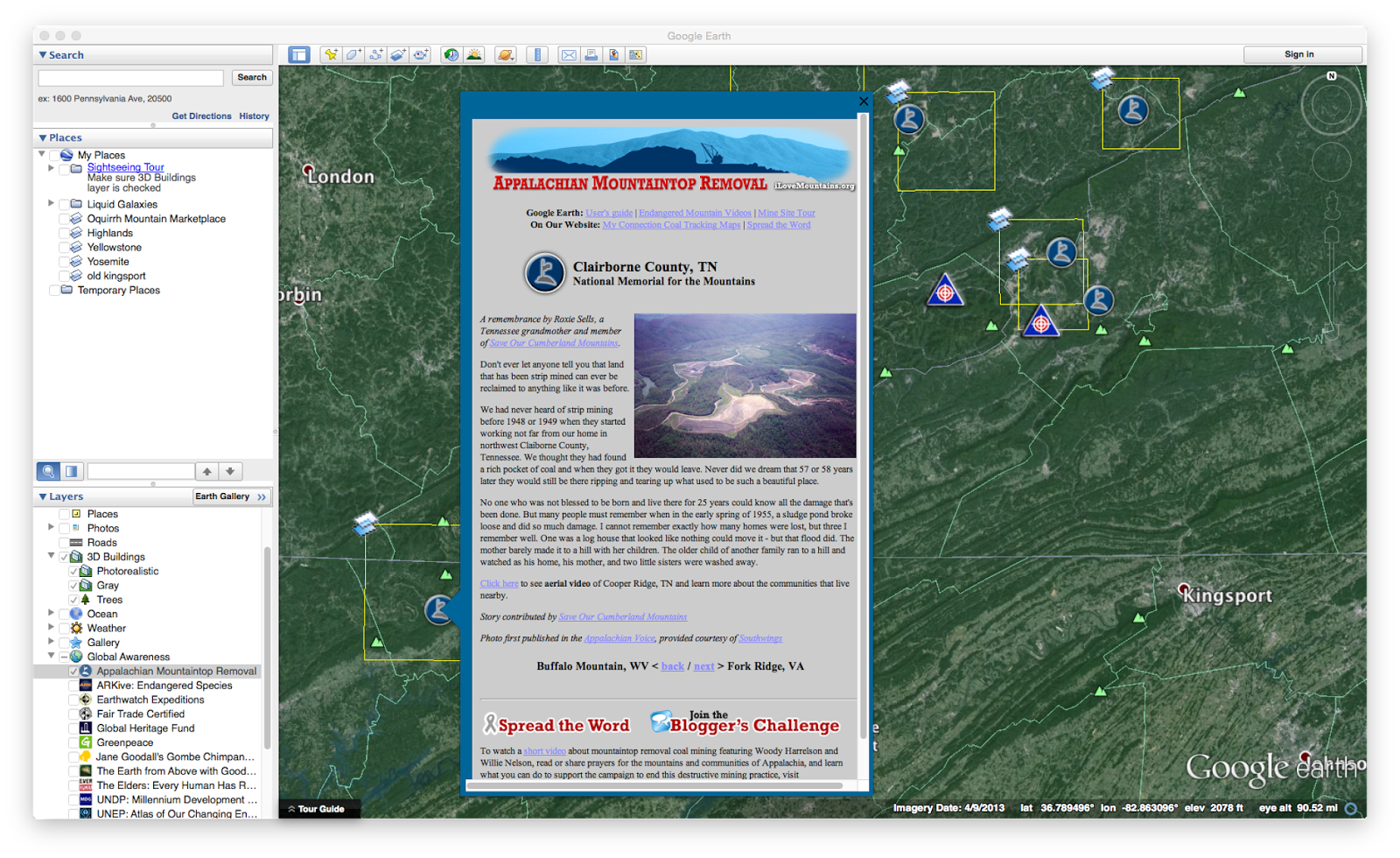
As you can see, however, that while some of these available layers are interesting on a desktop, they’re not necessarily very visually appealing on a Liquid Galaxy. We have identified a standard set of layers to enable and disable within Earth so that things don’t appear too cluttered while running. Some things we’ve disabled by default are the weather and the roads, as well as many levels of place names and boundaries. For example, we have boundaries of countries and water bodies enabled, but don’t want lines drawn for states, provinces, counties, or other areas such as those.
To disable these layers, we modify the GECommonSettings.conf file on the machines that running Earth. This file has everything pretty well spelled out in a …
google-earth visionport