
Getting the Most from your Claude Subscription

By Dan Briones
April 14, 2026

Photo by Josh Ausborne, 2006.
Every prompt you send to Claude Code costs tokens. If you understand where those tokens go and how to control them, you can stretch your subscription dramatically further. This guide covers the practical steps I have taken to keep my usage lean without sacrificing capability.
What are Tokens?
A token is the smallest unit of text Claude processes. A token is roughly three-quarters of a word. The sentence “Hello, how are you today?” is about seven tokens. Every interaction, yours and Claude’s, is measured in tokens drawn from a fixed context window.
Think of the context window as a whiteboard. Everything Claude needs to know must fit on it: your instructions, the conversation so far, any files it reads, and its own responses. When the whiteboard fills up, older content must be erased to make room.
What Loads with every Prompt
Most people assume they are only paying for the text they type. In reality, Claude loads a stack of context before it even reads your message.
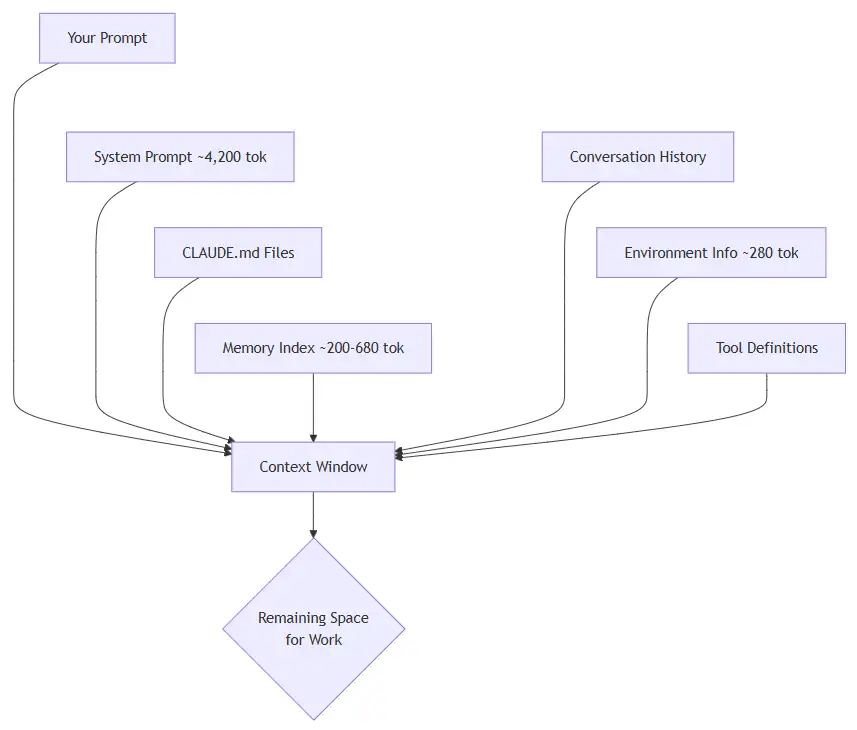
Breakdown of what gets loaded:
| Source | Tokens | When |
|---|---|---|
| System prompt | ~4,200 | Every … |
artificial-intelligence tools
High Level System Analysis and Design with Domain-Driven Design

By Kevin Campusano
April 6, 2026

Photo by Zed Jensen, 2022.
This is part 1 of a series of blog posts on Domain-Driven Design:
Domain-Driven Design is an approach to software development that focuses on, as Eric Evans puts it, “tackling the complexity in the heart of software”. And what is in the heart of software? The business domain in which it operates. Or more specifically: a model of it, made of code. That is, the code that implements the business logic that comes into play when solving problems within the realm of a particular business activity.
DDD is not just about writing code though. It’s a whole methodology that touches on business needs, requirements gathering, organizational dynamics, high level architectural design, and lower level patterns for implementing software intensive systems.
As a result, DDD offers a treasure trove of concepts, patterns and tools that can be applied to any software project, regardless of the size and complexity.
In this series of blog …
software architecture design books
Containerizing Claude Code with Podman

By Seth Jensen
March 31, 2026

Photo by Seth Jensen, 2026.
I’ve been experimenting with many different AI tools, and my favorite is Claude Code. It provides the impressive performance of the Opus models without forcing me to use Visual Studio Code (or a fork of it).
IDEs and fancy editors like IntelliJ and VS Code are great, but I often prefer the simplicity and low memory footprint of working directly in the terminal. Claude Code works well with my tmux-centered work environment.
However, I don’t like giving AI agents access to all of my files, and I really don’t like letting them run arbitrary commands in my shell. I’m already pretty cautious about running unvetted code on my machine (I’m looking at you, install.sh files I’m supposed to blindly curl | bash), and the nondeterministic nature of LLMs takes this to the next level. It’s not just data-sniffing closed-source code or malware you need to worry about, it’s the product itself running commands and editing files in ways that, by design, are unique and untested.
Claude Code has a sandbox mode which is supposed to limit filesystem access to the folder it’s run from, but since it’s closed-source (in …
artificial-intelligence podman containers
Why I Am Focusing on Intelligent Document Processing

By Edgar Mlowe
March 27, 2026

AI moves fast. A new model drops, a new framework launches, a new thing comes out, and suddenly what you learned last month feels old. LLMs, agents, fine-tuning, RAG, computer vision, multimodal models, prompt engineering, AI coding tools — the list keeps growing and it is hard to know where to focus.
Recently I decided to stop trying to follow all of it and focus on one area. In this post, I will explain what that area is, how I found it, and why I think it is worth paying attention to.
The problem with being an AI generalist
When AI started becoming a practical tool for software engineers (not just researchers), I jumped in. I wrote about deploying LLMs with Mixture of Experts, built an LLM-powered blog search, and worked on AI extraction pipelines for document processing. At work, our team was building document processing systems with LLMs. On the side, I was reading about everything else.
I was learning a lot, but I could not clearly say what I specialize in. If someone asked, “What is your thing in AI?” my answer was too broad to be useful.
Looking at the pattern in the projects
The turning point was stepping back and looking at the projects I had been involved …
artificial-intelligence data-processing tips
Why Your AI Extractor Fails on .msg Emails (and How to Fix Decoding)
By Edgar Mlowe
March 13, 2026

I want to share a debugging lesson that saved me from tuning the wrong layer in an AI extraction pipeline.
It started with a familiar symptom: extraction output looked inconsistent. Some rows were fine, but some had extra characters, especially accents. My first instinct was the same one most of us have: maybe the model needs prompt tuning.
It turned out not to be a model problem. The root cause was upstream data integrity: decoding .msg email HTML with the wrong charset.
The pattern that gives it away
If you see this mix, think decoding first:
- output is mostly correct, but certain names and addresses look garbled
- problems appear only for some senders or date ranges
.emllooks stable, but.msgis inconsistent
A classic sign looks like this:
- expected:
Müller - corrupted:
Müller
By the time your extractor sees that text, the meaning is already damaged.
Why .msg bites harder than .eml
Quick definitions:
.emlis the standard MIME email format and usually includes charset metadata per part..msgis an Outlook container format (MAPI), where body bytes and encoding hints can be stored separately.
That difference matters.
If your code assumes UTF-8 for .msg HTML bytes, non-UTF …
artificial-intelligence email unicode data-processing troubleshooting
How to Mount a BitLocker Drive on Linux at Login
By Seth Jensen
February 12, 2026

I recently reinstalled Linux on my desktop machine alongside Windows on a separate SSD. I also have a 3TB hard drive for backups and slower storage, which I formatted on Windows. I didn’t manually enable any encryption, but I got the following error when trying to mount it directly:
mount: /mnt/<mydrive>: unknown filesystem type 'BitLocker'Looks encrypted to me! After some googling, I found a common solution is to use dislocker to decrypt the drive.
I was confused because my drive wasn’t encrypted, but the filesystem type was still “BitLocker”. My guess is that Windows encrypted the drive by default, though as you’ll see soon, it uses a “clear key,” meaning it’s technically encrypted but the key is stored unencrypted, meaning anyone can decrypt the drive. I suppose they want me to set up encryption somehow, but since this is a home computer, I don’t mind it being unencrypted for now.
If your drive is encrypted, there are a few extra steps. There’s an excellent guide on std.rocks1 for this. I’ll also annotate the fstab-specific section so you know where to put the recovery key there.
Installing …
linux sysadmin tips
Running Ruby in Podman (When rbenv install Fails on Apple Silicon)
By Seth Jensen
January 12, 2026

I recently worked on a legacy Ruby backend app which hadn’t been changed for years. A Ruby development environment used to be provided by DevCamps for this site, but over the years we stopped using Ruby other than this small backend, so we also stopped using camps.
The frontend development now uses its own local dev server, so I decided to do the same for the backend by running the Unicorn server locally. I’m on a MacBook M2, so I should just be able to install rbenv using Homebrew. Easy, right?
Unfortunately not. I had a great deal of trouble getting any version of Ruby to run natively on my MacBook M2, so I eventually resorted to using Podman. You can skip to the end for my solution.
First try: native rbenv
The rbenv installation went just fine:
brew install rbenv ruby-buildAnd after adding eval "$(rbenv init -)" to my ~/.zshrc file, I tried to install the old version of Ruby:
rbenv install 2.4.10However, this returned a BUILD FAILED message. Strangely, it also failed with a new version of Ruby (3.3.10). I tried debugging for a while before giving up — I figured this project isn’t worth multiple hours of getting a local Ruby installation to work …
ruby rails macos containers podman
Quick and Dirty Admin Pages with Rails scaffold_controller

By Couragyn Chretien
December 29, 2025

You’re building a Rails application, and you’ve reached that point where you or your team needs a simple way to manage data. You need an admin interface. You’ve heard of heavy-weight solutions like ActiveAdmin or Rails Admin, but they feel like overkill for adding a few new categories or moderating user posts. You don’t want to spend an afternoon configuring a gem. You need something now.
Luckily Rails has a built-in lightning-fast way to generate a fully functional admin CRUD interface for any existing model. Meet the often-overlooked scaffold_controller generator. It’s the secret weapon for building “quick and dirty” internal tools.
What Is scaffold_controller and Why Use It?
When you run rails generate scaffold Post, it creates everything: the model, migration, controller, and views. The scaffold_controller generator does only half of that, creating only the controller and views (as long as the model already exists).
This is perfect for creating a separate admin namespace because:
- It’s Non-Destructive: Your existing, user-facing PostsController remains untouched
- It’s Fast: One command gives you a complete set of CRUD …
rails