
Performing Bulk Edits in Rails: Part 2

By Brian Buchalter
December 3, 2011
This is the second article in the series on how to perform a bulk edit in Rails. Let’s recap our user’s story from Part 1.
-
User makes a selection of records and clicks “Bulk Edit” button
-
User works with the same form they would use for a regular edit, plus
- check boxes are added by each attribute to allow the user to indicate this variable should be affected by the bulk edit
- only attributes which are the same among selected records should be populated in the form
Part 1 addressed the first part of our user story. Now that we have our user’s selection, we need to create an interface to allow them to select attributes affected by the bulk edit. Let’s start with the form we’ll use to POST our input.
# app/controllers/bulk_edits_controller.rb

def new
  @foos = Foo.find(params[:stored_file_ids]) #params collected by work done in Part 1
  @foo = Foo.new
end

# app/views/bulk_edit/new.html.erb

<%= form_for @foo, :url => "/bulk_edits" do |f| %>
  <% @foos.each do |foo| %>
    <%= hidden_field_tag "foo_ids[]", foo.id %>
  <% end %>
  <%= render "foos/form", :f => f %>
  <%= f.submit %>
<% end  %>
Let’s first …
rails
Kamelopard Release

By Josh Tolley
November 30, 2011

After completing no small amount of refactoring, I’m pleased to announce a new release of Kamelopard, a Ruby gem for generating KML. KML, as with most XML variants, requires an awful lot of typing to write by hand; Kamelopard makes it all much easier by mechanically generating all the repetitive XML bits and letting the developer focus on content. An example of this appears below, but first, here’s what has changed most recently:
- All KML output comes via Ruby’s REXML library, rather than simply as string data that happens to contain XML. This not only makes it much harder for Kamelopard developers to mess up basic syntax, it also allows examination and modification of the KML data using XML standards such as XPath.
- Kamelopard classes now live within a module, preventing namespace collisions. This is important for any large-ish library, and probably should have been done all along. Previous to this, some classes had awfully strange names designed to prevent namespace collisions; these classes have been changed to simpler, more intuitive names now that collisions aren’t a problem.
- Perhaps the biggest change is the incorporation of a large and (hopefully) comprehensive test suite. …
visionport open-source ruby kamelopard kml
Book Recommendation: Ghost in the Wires

By Steph Skardal
November 29, 2011

I recently listened to Ghost in the Wires by Kevin Mitnick as an audiobook during my long Thanksgiving vacation drives. This non-fiction book is a first-person account about Kevin Mitnick’s phone and computer break-in (or what he claims to be ethical hacking) adventures in the late eighties and early nineties, and it touches on the following legal proceedings from 1995 on. A couple of interesting things stood out to me:
- Kevin’s tactics revolve around social engineering, or techniques that capitalize on flaws in “human hardware” to gain information. The book was an eye opener in terms of how easily Kevin gained access to systems, as there are countless examples of Kevin’s ability to gain credibility, pretext, introduce diversions, etc.
- Another highlight of the book for me was learning details of how bug reports were exploited to gain sensitive information. Kevin gained access to bug reports on proprietary software to exploit the software and gain access to the systems running the software. I don’t think of my own clients’ bug reports as an extremely valuable source of information for exploiting vulnerabilities to gain user information, but there have been a few instances in the …
books security
Global Variables in Interchange Jobs

By Mark Johnson
November 28, 2011
Those familiar with writing global code in Interchange are certainly familiar with the number of duplicate references of certain global variables in different namespaces. For example, the Values reference is found in both the main namespace ($::Values) as well as in Vend::Interpolate ($Values usually from within usertags). One can also access the Values reference through the Session reference, which itself can be found in main ($::Session), Vend ($Vend::Session), and Vend::Interpolate ($Session usually from within usertags) namespaces with, e.g., $::Session->{values}. Most times, as long as context allows, any of those access points are interchangeable, and there’s a good mix you see from developers using all of them.
In recent work for a client, I had developed an actionmap that incorporated access to the session for some of its coding—certainly not an uncommon occurrence. When I work in global space, I tend to use the main namespace references since they are available in all contexts within Interchange (or so I thought). The actionmap was constructed, tested, and put into production, where it worked as expected.
After a short period of operation, the client came to us and …
interchange automation testing
Appending one PDF to another using PDF Toolkit
By Brian Buchalter
November 22, 2011
Ever need to manipulate PDFs? Prefer the command line? Us too. Imagine you have a contract in PDF format. When people print, sign, and re-scan the contract, that’s good documentation of the signature, but the clarity of the original machine-readable text is lost and the the file’s size is unnecessarily large. One solution is to append the scanned signature page to the original contract document.
There are many PDF editors out there which address this need. One command line solution that works well is PDF Labs’s PDF Toolkit. Let’s look at how we would use PDF Toolkit to append one document to another.
pdftk contract.pdf scanned_contract.pdf cat output original_and_signed_contract.pdfWith this command we now have both contracts in their entirety. What we really want is to just take the signature page and append it. Let’s revise our command a bit to only take the signature page using what PDF Toolkit calls handles.
pdftk A=contract.pdf B=scanned_contract.pdf cat A B5 output contract_with_signature_attached.pdfWe’ve assigned each document to a handle (A and B), which allows us to define the order of the output as well as the pages we want to select for the output. With the argument …
tips tools pdf
Performing Bulk Edits in Rails: Part 1
By Brian Buchalter
November 14, 2011
This will be the first article in a series, outlining how to implement a bulk edit in Rails 3.1.1 (although most any version of Rails will do). Today we’ll be focusing on a simple user interface to allow the user to make a selection of records. But first, let’s look at our user story.
The user story
-
User makes a selection of records and clicks “Bulk Edit” button
-
User works with the same form they would use for a regular edit, plus
- check boxes are added by each attribute to allow the user to indicate this variable should be affected by the bulk edit
- only attributes which are the same among selected records should be populated in the form
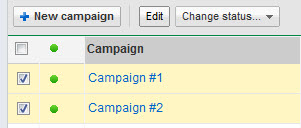
An example UI from Google’s AdWords interface for
selecting multiple records for an action.
Sounds straight forward, right? Well, there are a couple of gotcha’s to be worked out along the way.
Capturing the user’s selection
We’d like to offer the user a form with check boxes to click so when submitted, our controller gets an array of IDs we can pass to our ActiveRecord finder. It’s best implemented using check_box_tag which means it’s not auto-magically wired with an ActiveRecord object, which makes sense in this case because we don’t want …
rails
Advanced Rights and Roles Management in Rails
By Steph Skardal
November 11, 2011
I’ve been working with Phunk, Brian Buchalter, and Evan Tann on a large Rails 3.1 project that has included several unique challenges. One of these challenges is a complex rights, roles, and access control system, which I’ll discuss here.
Before I wrote any code, I researched existing authorization systems, and came across this article which lists a few of the popular authorization gems in Rails. After reading through the documentation on several more advanced current authorization gems, I found that no gem offered the level of complexity we needed, where rights are layered on top of roles and can be mapped out to specific actions. Because the client and my team were most familiar with acl9, we chose to work with it and layer rights on top of the existing access control subsystem. Here’s a look at the data model we were looking for:

The data model shows a has_and_belongs_to_many (or many-to-many) relationship between users and roles, and roles and rights. Things are an example model, which belong_to users. Rights map out to methods in the controller that can be performed on thing instances.
Implementation
Starting from the admin interface, a set of rights can be assigned to a …
ruby rails
Finding PostgreSQL temporary_file problems with tail_n_mail

By Greg Sabino Mullane
November 10, 2011

Image by Flickr user dirkjanranzijn
PostgreSQL does as much work as it can in RAM, but sometimes it needs to (or thinks that it needs to) write things temporarily to disk. Typically, this happens on large or complex queries in which the required memory is greater than the work_mem setting.
This is usually an unwanted event: not only is going to disk much slower than keeping things in memory, but it can cause I/O contention. For very large, not-run-very-often queries, writing to disk can be warranted, but in most cases, you will want to adjust the work_mem setting. Keep in mind that this is very flexible setting, and can be adjusted globally (via the postgresql.conf file), per-user (via the ALTER USER command), and dynamically within a session (via the SET command). A good rule of thumb is to set it to something reasonable in your postgresql.conf (e.g. 8MB), and set it higher for specific users that are known to run complex queries. When you discover a particular query run by a normal user requires a lot of memory, adjust the work_mem for that particular query or set of queries.
How do you tell when you work_mem needs adjusting, or more to the point, when Postgres is writing files …
database monitoring performance postgres