
Liquid Galaxy for the Daniel Island School

By Dave Jenkins
August 22, 2014
This past week, End Point had the distinct pleasure of sending a Liquid Galaxy Express (the highly portable version of the platform) to the Daniel Island School in Charleston, South Carolina. Once it arrived, we provided remote support to their staff setting up the system. Through the generous donations of Mason Holland, Benefitfocus, and other donors, this PK-8 grade school is now the first school in the country below the university level with a Liquid Galaxy on campus.
From Claire Silanowicz, who coordinated the installation:
Mason Holland was introduced to the Liquid Galaxy system while visiting the Google Headquarters in San Francisco several months ago. After deciding to donate it to the Daniel Island School here in Charleston, SC, he brought me on to help with the project. I didn’t know much about the Liquid Galaxy at first, but quickly realized how cool of a project this was going to be. With some help, I assembled a team of about 8 Benefitfocus employees to help with installation and long-term implementation. Benefitfocus is full of employees who are so passionate about innovative technology, and Mason’s involvement with Benefitfocus was a perfect way to connect the …
visionport clients education
Spree Commerce, Take Care When Offering Free Shipping Promotion

By Matt Galvin
August 20, 2014
Hello again all. I was working on another Spree Commerce Site, a Ruby on Rails based e-commerce platform. As many of you know, Spree Commerce comes with Promotions. According to Spree Commerce documentation, Spree Commerce Promotions are:
“… used to provide discounts to orders, as well as to add potential additional items at no extra cost. Promotions are one of the most complex areas within Spree, as there are a large number of moving parts to consider.”
The promotions feature can be used to offer discounts like free shipping, buy one get one free etc.. The client on this particular project had asked for the ability to provide a coupon for free shipping. Presumably this would be a quick and easy addition since these types of promotions are included in Spree.
The site in question makes use of Spree’s Active Shipping Gem, and plugs in the UPS Shipping API to return accurate and timely shipping prices with the UPS carrier.
The client offers a variety of shipping methods including Flat Rate Ground, Second Day Air, 3 Day Select, and Next Day Air. Often, Next Day Air shipping costs several times more than Ground. E.g.: If something costs $20 to ship Ground, it could easily cost …
ruby spree
Postfix IPv6 preference

By Jon Jensen
August 19, 2014
On a Debian GNU/Linux 7 (“wheezy”) system with both IPv6 and IPv4 networking setup, running Postfix 2.9.6 as an SMTP server, we ran into a mildly perplexing situation. The mail logs showed that outgoing mail to MX servers we know have IPv6 addresses, the IPv6 address was only being used occasionally, while the IPv4 address was being used often. We expected it to always use IPv6 unless there was some problem, and that’s been our experience on other mail servers.
At first we suspected some kind of flaky IPv6 setup on this host, but that turned out not to be the case. The MX servers themselves are fine using only IPv6. In the end, it turned out to be a Postfix configuration option called smtp_address_preference:
smtp_address_preference (default: any)
The address type (“ipv6”, “ipv4” or “any”) that the Postfix SMTP client will try first, when a destination has IPv6 and IPv4 addresses with equal MX preference. This feature has no effect unless the inet_protocols setting enables both IPv4 and IPv6. With Postfix 2.8 the default is “ipv6”.
Notes for mail delivery between sites that have both IPv4 and IPv6 connectivity:
The setting “smtp_address_preference = ipv6” is unsafe. It can fail to …
email ipv6 linux sysadmin
Ubuntu upgrade gotchas

By Greg Sabino Mullane
August 16, 2014

I recently upgraded my main laptop to Ubuntu 14.04, and had to solve a few issues along the way. Ubuntu is probably the most popular Linux distribution. Although it is never my first choice (that would be FreeBSD or Red Hat), Ubuntu is superb at working “out of the box”, so I often end up using it, as the other distributions all have issues.
Ubuntu 14.04.1 is a major “LTS” version, where LTS is “long term support”. The download page states that 14.04 (aka “Trusty Tahr”) comes with “five years of security and maintenance updates, guaranteed.” Alas, the page fails to mention the release date, which was July 24, 2014. When a new version of Ubuntu comes out, the OS will keep nagging you until you upgrade. I finally found a block of time in which I could survive without my laptop, and started the upgrade process. It took a little longer than I thought it would, but went smoothly except for one issue:
Issue 1: xscreensaver
During the install, the following warning appeared:
“One or more running instances of xscreensaver or xlockmore have been detected on this system. Because of incompatible library changes, the upgrade of the GNU libc library will leave you …
linux ubuntu emacs
The Beauty of IPMI

By Josh Ausborne
August 1, 2014
For our Liquid Galaxy installations, we use a master computer known as a “head node” and a set of slave computers known as “display nodes.” The slave computers all PXE-boot from the head node, which directs them to boot from a specific ISO disk image.
In general, this system works great. We connect to the head node and from there can communicate with the display nodes. We can boot them, change their ISO, and do all sorts of other maintenance tasks.
There are two main settings that we change in the BIOS to make things run smoothly. First is that we set the machine to power on when AC power is restored. Second, we set the machine’s boot priority to use the network.
Occasionally, though, the CMOS battery has an issue, and the BIOS settings get lost. How do we get in and boot the machine up? This is where ipmitool has really become quite handy.
Today we had a problem with one display node at one of our sites. It seems that all of the machines in the Liquid Galaxy were rebooted, or otherwise powered off and then back on. One of them just didn’t come up, and it was causing me much grief. We have used ipmitool in the past to be able to help us administer the machines.
IPMI stands for …
hosting linux visionport
Point Clouds on the Liquid Galaxy

By Josh Tolley
July 31, 2014
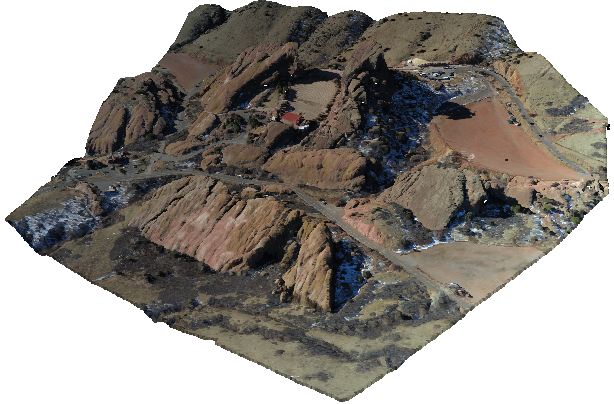
Image by Stoermerjp, unmodified (CC BY-SA 3.0)
The Liquid Galaxy began as a system to display geographic data through Google Earth, but it has expanded quickly as a display platform for other types of information. We’ve used Liquid Galaxies for panoramic images and video, three dimensional models of all sorts, as well as time-lapse renderings of weather, infrastructure, and economic data. Now we’ve added support for a new type of data, the point cloud.
“Point cloud” is simply the common term for a data set consisting of individual points, often in three-dimensional space, and frequently very large, containing thousands or millions of entries. Points in a cloud can include not just coordinate data, but other information as well, and because this sort of data can come from many different fields, the possible variations are endless. For instance, the terrain features visible in Google Earth began life as point clouds, the output of an aerial scanning device such as a LIDAR scanner. These scanners sweep their field of view rapidly, scanning millions of points to determine their location and any other interesting measurements—color, for instance, or temperature—and with that data …
graphics visionport
PyOhio 2014: Python FTW!

By Josh Williams
July 31, 2014

Just got back from PyOhio a couple of days ago. Columbus used to be my old stomping grounds so it’s often nice to get back there. And PyOhio had been on my TODO for a number of years now, but every time it seemed like something else just got in the way. This year I figured it was finally time, and I’m quite glad it worked out.
While of course everything centered around usage with Python, much of the talks surrounded other tools or projects. I return with a much better view of good technologies likes Redis, Ansible, Docker, ØMQ, Kafka, Celery, asyncio in Python 3.4, Graphite, and much more that isn’t coming to mind at the moment. I have lots to dig into now.
It also pleased me to see so much Postgres love! I mean, clearly, once you start to use it you’ll fall in love, that’s without question. But the hall track was full of conversations about how various people were using Postgres, what it tied in to in their applications, and various tips and tricks they’d discovered in its functionality. Just goes to prove that Postgres == ♥.
Naturally PostgreSQL is what I spoke on; PL/Python, specifically. It actually directly followed a talk on PostgreSQL’s LISTEN/NOTIFY feature. I was a touch …
conference postgres python
Customizing the Nestable jQuery Plugin

By Steph Skardal
July 29, 2014
A while back, we started using the Nestable jQuery Plugin for H2O. It provides interactive hierarchical list functionality – or the ability to sort and nest items.
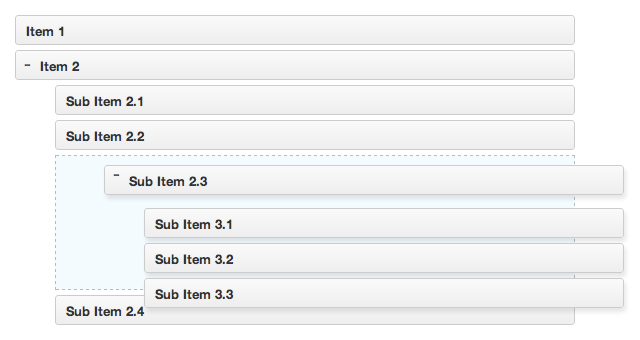
Diagram from Nestable jQuery Plugin representing interactive hierarchical sort and list functionality.
I touched on H2O’s data model in this post, but it essentially mimics the diagram above; A user can build sortable and nestable lists. Nesting is visible at up to 4 levels. Each list is accessible and editable as its own resource, owned by a single user. The plugin is ideal for working with the data model, however, I needed a bit of customization that I’ll describe in this post.
Limiting Nestability to Specific List Items
The feature I was requested to develop was to limit nesting to items owned by the current authorized (logged in) user. Users can add items to their list that are owned by other users, but they can not modify the list elements for that list item. In visual form, it might look something like the diagram below, where green represents the items owned by the user which allow modified nesting, and red represents items that are not owned by the user which can not be modified. In the diagram below, I would …
javascript