
Rails Request-Based Routing Constraints in Spree

By Brian Gadoury
December 21, 2011
I recently adopted an unreleased ecommerce project running Spree 0.60.0 on Rails 3.0.9. The site used a Rails routing constraint and wildcard DNS to dynamically route subdomains to the “dispatch” action of the organizations_controller. If a request’s subdomain component matched that regular expression, it was routed to the dispatch method. Here’s the original route:
match '/' => 'organizations#dispatch', :constraints => { :subdomain => /.+/ }The business requirement driving this feature was that a User could register an Organization by submitting a form on the site. Once that Organization was marked “approved” by an admin, that Organization would become accessible at their own subdomain—no server configuration required.
For marketing reasons, we decided to switch from subdomains to top-level subdirectories. This meant RESTful routes (e.g. domain.com/organizations/143) wouldn’t cut it. In order to handle this, I created a routing constraint class called OrgConstraint. This routing constraint class works in tandem with a tweaked version of that original route.
match '*org_url' => 'organizations#show', :constraints => OrgConstraint.new …ecommerce open-source ruby rails spree
Modifying Models in Rails Migrations

By Sonny Cook
December 20, 2011
As migrations have piled up in projects that I work on, one problem seems to come up fairly consistently. New changes to models can break migrations.
This can happen a number of different ways. One way is to break old migrations. Another is for the changes to be made to the file before the migration is run (timing issues with version control).
While these can be (and usually are) considered coordination rather than technical issues, sometimes you just need to handle them and move on.
One case I’d like to cover here is removing or changing associations. At the time the migration is expected to run, the file for the model class will have been updated already, so it is hard use that in the migration itself, even though it would be useful.
In this case I found myself with an even slightly trickier example. I have a model that contains some address info. Part of that is an association to an external table that lists the states. So part of the class definition was like so:
Class Contact
 belongs_to :state
 ...
end
What I needed to do in the migration was to remove the association and introduce another field called “state” which would just be a varchar field representing the state part …
ruby rails
Nifty In-Button Confirmation

By Evan Tann
December 19, 2011
I’ve been working on a personal email client after work, called Warm Sunrise, that forces myself to keep a manageable inbox. One of the goals of the project was to get to a zero-inbox everyday, so I needed a ‘Delete All’ button that was easy-to-use without running the risk of accidentally deleting emails. I took a look at JavaScript’s confirm, which is jarring, and jQuery’s dblClick, which doesn’t provide any feedback to the user after the first click, leaving the user to wonder why their emails weren’t deleted.
Given these options, I built my own button using Rails 3.1, jQuery, and CoffeeScript, that better fit the goals I set out with. It requires a double click, but gives the user a confirmation in the button itself, without any sort of timeout.
Starting with app/views/letters/index.html.erb, I generated the buttons using Rails helpers and Twitter’s Bootstrap classes:
<%= link_to 'Write letter', new_letter_path, :class => "btn primary pull-right far-right" %>
<%= link_to 'Delete all', '#', :class => "btn pull-right no_danger", :id => "delete_all" %>
<%= link_to 'Are you sure?', …
javascript jquery rails
Sanitizing supposed UTF-8 data

By Jon Jensen
December 17, 2011
As time passes, it’s clear that Unicode has won the character set encoding wars, and UTF-8 is by far the most popular encoding, and the expected default. In a few more years we’ll probably find discussion of different character set encodings to be arcane, relegated to “data historians” and people working with legacy systems.
But we’re not there yet! There’s still lots of migration to do before we can forget about everything that’s not UTF-8.
Last week I again found myself converting data. This time I was taking data from a PostgreSQL database with no specified encoding (so-called “SQL_ASCII”, really just raw bytes), and sending it via JSON to a remote web service. JSON uses UTF-8 by default, and that’s what I needed here. Most of the source data was in either UTF-8, ISO Latin-1, or Windows-1252, but some was in non-Unicode Chinese or Japanese encodings, and some was just plain mangled.
At this point I need to remind you about one of the most unusual aspects of UTF-8: It has limited valid forms. Legacy encodings typically used all or most of the 255 code points in their 8-byte space (leaving point 0 for traditional ASCII NUL). While UTF-8 is compatible with 7-bit ASCII, it does not …
perl postgres tips tools unicode
Hurray for tracking configuration files in source control

By Josh Williams
December 15, 2011
In a number of places we’ve started tracking configuration files locally in Git. It’s great for Postgres configs, Apache or nginx, DNS zone files, Nagios, all kinds of things. A few clients have private offsite repos we push to, like at GitHub, but for the most part they’re independent repos. It’s still great for keeping track of what was changed when, and by whom.
In one case we have a centralized Nagios instance that does little more than receive passive checks from a number of remote systems. I’d set the checks on the remote systems but not loaded that configuration in yet. However while getting the central system set up, muscle memory kicked in and I suddenly had a half-red console as it’s loading in stale data.
We don’t need a flood of false alerts over email, but I don’t want to completely revert the config and lose all those services…
[root nagios]# git stash; service nagios restart; git stash apply
Saved working directory and index state WIP on master: 0e9113b Made up commit for blog
HEAD is now at 0e9113b Made up commit for blog
Running configuration check...done.
Stopping nagios: .done.
Starting nagios: done.
# On branch master
# (etc)
Green! A small victory, for …
git monitoring
Preventing Global Variables in JavaScript
By Evan Tann
December 15, 2011
JavaScript’s biggest problem is its dependence on global variables ―Douglas Crockford, JavaScript: The Good Parts
Recently I built out support for affiliate management into LocateExpress.com’s Sinatra app using JavaScript and YUI.
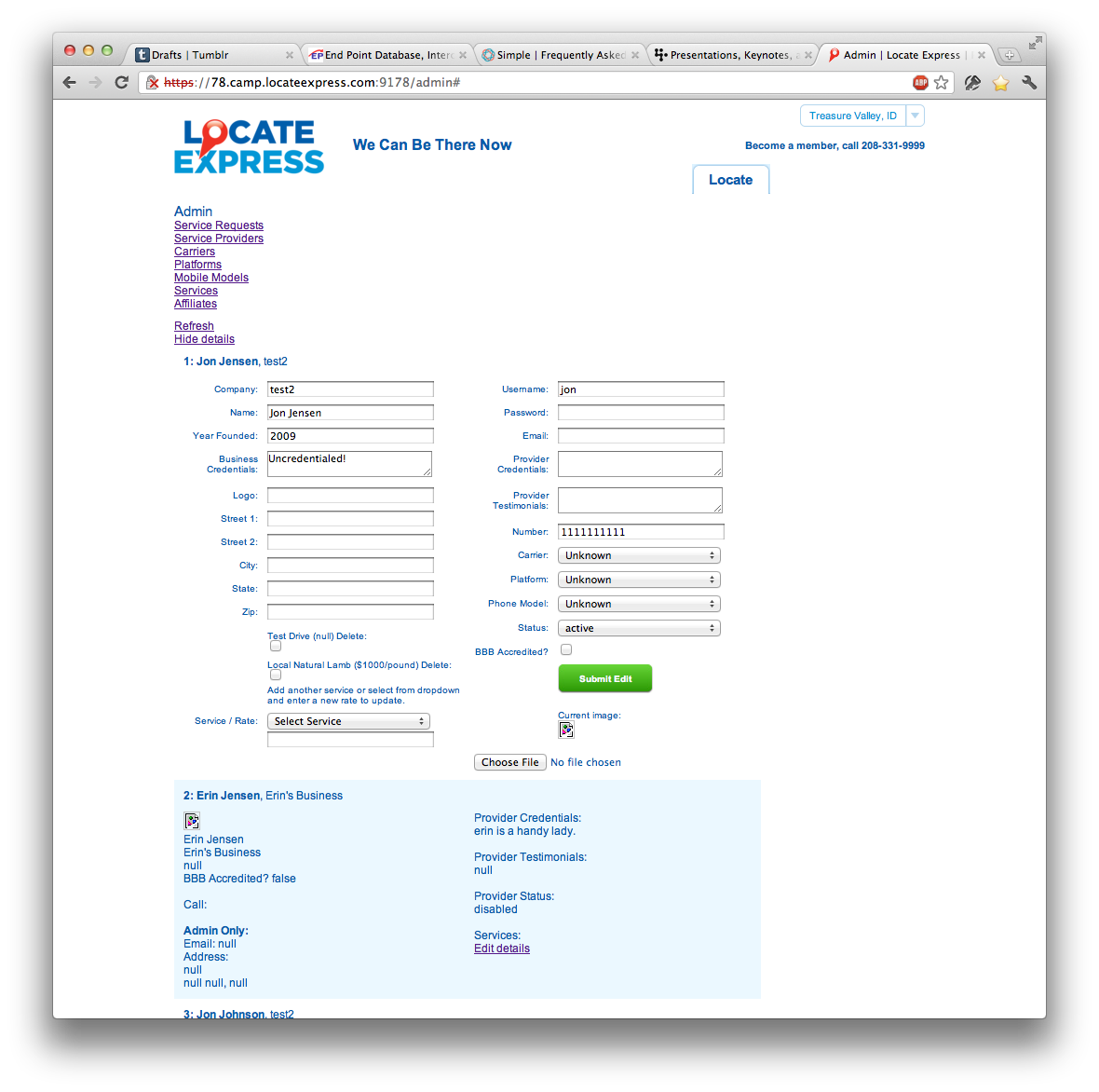
I used a working page from the admin, Service Providers, as a starting point to get something up and running for affiliates quickly. By the time I finished, the Affiliates page worked great, but forms on the Service Provider page no longer populated with data.
Identifying a misbehaving global variable
There were no errors in the console, and the forms on the Service Providers page remained broken even after restoring an old copy of service_providers.js. As it turns out, a global variable, edit_map, was defined within service_providers.js, and again in the copied affiliates.js. Credit for spotting the problem goes to Brian Miller.
The fix was as simple as moving edit_map’s declaration into the file’s YUI sandbox, so that version of edit_map wouldn’t be visible to any other pages in the admin.
Preventing global variables
As projects grow and complexity increases, it becomes easier and easier to overlook global variables and thus run into this …
javascript
Using Gmail at Work

By Brian Buchalter
December 15, 2011
The Short Story
For those who don’t care about why, just how…
- Create a new Gmail account
- Setup Mail Fetcher
- Setup send email from another account;and make it your default
- Verify you send and receive as your corporate address by default using the web client
- Setup your mobile
- From your mobile go to m.google.com/sync and Enable “Send Mail As” for this device (tested only on iOS)
- Verify you send and receive as your corporate address by default using your mobile client
- Setup Google Authorship with your domain’s email address
The Long Story
Here at End Point there are a lot of opinions about email clients. Our hardcore folks like Alpine while for most people Evolution, Thunderbird, or Outlook will do. As a Gmail user since September 2004, I found I needed to figure out how get our corporate email system to work with my preferred client.
My first reaction was to have Gmail act as an IMAP client. I found (as many others had) that Gmail does not support IMAP integration with other accounts. However, Gmail does have a POP email client known as Mail Fetcher. I found that Gmail does support encrypted connections via POP, so use them if your email server supports them. When combined …
email mobile
Liquid Galaxy at Le Pavillon de l’Arsenal in Paris

By Benjamin Goldstein
December 12, 2011
Today there was an exciting opening of a new 48-screen Liquid Galaxy display at Le Pavillon de l’Arsenal in Paris. The configuration and use of this display is distinct from other Liquid Galaxies in that it consists of six columns and eight rows of 55” bezel-less displays set out on the floor to show just the city of Paris. This Liquid Galaxy replaced a physical model of Paris that was previously set up in the same space. It has four podiums with touch screens that visitors can use to navigate about Paris. The museum produced an impressive video showing the setup of this project:
End Point had the pleasure of working for and with Google on this project. Pierre Lebeau of Google spearheaded the project—at least from our point of view. Pierre’s quick and clever thinking from a high-level perspective and his leadership were crucial for getting the project done on schedule. He’s posted a nice blog article about the project. In addition to the Googlers on site our engineers also had the opportunity to see the talented museum staff at work and to work with JCDecaux who set up and are supporting the Planar Clarity displays. Kiel Christofferson and Adam Vollrath spent a couple of weeks …
clients visionport