
Speedier column additions in PostgreSQL

By Jeff Boes
July 17, 2013
Say you want to add a column to a large table, e.g.,
ALTER TABLE transactions ADD COLUMN email_sent BOOLEAN DEFAULT FALSE;You really do want new rows to start out with the column “false” (if no value is supplied when the row is created). However, you also want all existing rows to be “true”, so innocently:
UPDATE transactions SET email_sent = TRUE;This is a great time for a coffee break, or a trip to the post office, or maybe (if you’re a telecommuter like me), a stroll out to weed the garden. Unfortunately for all those side activities, you really didn’t have to take the long way.
BEGIN;
ALTER TABLE transactions ADD COLUMN email_sent BOOLEAN DEFAULT TRUE;
ALTER TABLE transactions ALTER TABLE email_sent SET DEFAULT FALSE;
COMMIT;
This is a lot faster; create all the columns with the appropriate value, then set the default for new rows, and all inside a transaction so you know it gets done atomically.
postgres sql
Kamelopard update—Panoramic camera simulation, and splines have returned

By Josh Tolley
July 16, 2013
A few days ago I pushed Kamelopard version 0.0.12 to RubyGems. This version includes a couple big items. The first of these is a new implementation of the spline code that was removed a while ago. As I mentioned in a previous blog post, this original implementation was built in anticipation of an API that never materialized. The new version is built on the same API discussed in the previous post I mentioned, modified to support multidimensional functions. More information about these splines is available on the wiki for Liquid Galaxy.
The other big new feature is the ability to simulate multiple-camera panoramic images, which we’re calling “multicam”. It has its own wiki page as well, but I wanted to describe it in greater detail, because there’s a fair bit of 3D geometry involved that seemed blog-worthy. First, though, it’s important to understand the goal. In a Liquid Galaxy, each instance of Google Earth displays the view from one virtual “camera”. One display’s camera points exactly where you tell it to point; the others point to one side or the other, based on a few settings in a Google Earth configuration file. When placed side-by-side in the right order, these displays form …
google-earth graphics kamelopard visionport open-source ruby kml
Vim tabs and splits

By Mike Farmer
July 15, 2013
Vim is my go-to code editor these days. After many years of using different editors, I’ve settled on Vim as my editor of choice. There are some things I’ve done to make using Vim more enjoyable and usable and this blog post is dedicated to some of those things that I use everyday.
Tabs
I love using tabs in Vim. I know there are some who are opposed to tabs, but I find them invaluable. The default shortcuts for manipulating tabs are a little cumbersome, which I believe deters many users. Here are some modifications that I added to my vimrc.
nmap <silent> tt :tabnew<CR>
nmap <silent> [g :tabprevious<CR>
nmap <silent> ]g :tabnext<CR>
nmap <silent> [G :tabrewind<CR>
nmap <silent> ]G :tablast<CR>
First, I’m using nmap here which says to only map these keys in normal mode. Next, I use tt work really well for normal mode and I love their simplicity. Double-tap t and you have a new tab. Using the bracket navigation is something that I’ve stolen from Tim Pope’s vim-unimpaired plugin. Using g and G work …
vim
SFTP virtual users with ProFTPD and Rails: Part 2

By Brian Gadoury
July 10, 2013
In Part 1 of “SFTP virtual users with ProFTPD and Rails”, I introduced ProFTPD’s virtual users and presented my annotated proftpd.conf that I used to integrate virtual users with a Rails application. Here in Part 2, I’ll show how we generate virtual user credentials, how we display them to the user, as well as our SftpUser ActiveRecord model that does the heavy lifting.
Let’s start at the top with the SFTP credentials UI. Our app’s main workflow actually has users doing most of their uploads through a sweet Plupload widget. So, by default, the SFTP functionality is hidden behind a simple button sitting to the right of the Plupload widget:
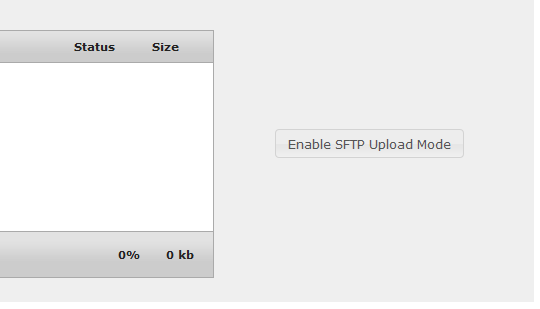
The user can click that button to open the SFTP UI, or the Plupload widget will open it automatically if the user tries to upload a file through the widget that is too big. Either way, it uses a jQuery UI function to slide the SFTP UI open. Before it makes the jQuery call, an Ajax request is made to request a new SFTP virtual user username and password. When that request returns, we populate those two textboxes. At that point, that virtual user exists as a new row in the sftp_users database table. At this point in the workflow, the user will be …
database mysql postgres ruby rails
Challenges in testing Dancer 2.0 apps
By Jeff Boes
July 9, 2013
I’ve been dabbling in Dancer, and I managed to put together a moderately complex re-hosting of a web application with Dancer 1.0, including a preliminary package of unit tests via Test::More.
Spoiler alert: I don’t yet have a solution, but I thought maybe this blog post would organize my thoughts to where someone else might peek in and spot my problem.
A bit of introduction follows for those who may not have been down this path before.
Testing a web application can take one of two general approaches:
- Test the underlying code by calling it directly, one program to another, with no web server involved. This is pretty straightforward, although you may have to rig up some replacements for the environment (such as if your code expects CGI parameters, or reacts to things in the web server environment such as cookies, remote IP address, etc.). In any case, you have to recognize that you are now testing the code logic, not the actual interaction of your code as a subsystem in the web server.
- Test the web application in its “native environment”, by issuing requests to its associated web server and examining the responses (as web pages, JSON, what-have-you). This is much preferred, as it …
dancer perl testing
Proxmox and the fun maze of IPv6 connectivity

By Emanuele “Lele” Calò
July 8, 2013
While working on the Proxmox machine setup and specifically on the IPv6 connectivity I found a problem where after a reboot I always kept getting the *** net.ipv6.conf.all.forwarding*** and all related variable set to 0, thus giving lots of IPv6 network connectivity issues on the guests.
While brainstorming with a colleague on this, we discovered in the boot logs these few messages which are quite indicative of something horrible happening at boot:
# less /var/log/boot.0
[..]
Mon Jul  8 18:38:59 2013: Setting kernel variables ...sysctl: cannot stat /proc/sys/net/ipv6/conf/all/forwarding: No such file or directory
Mon Jul  8 18:38:59 2013: sysctl: cannot stat /proc/sys/net/ipv6/conf/default/forwarding: No such file or directory
Mon Jul  8 18:38:59 2013: sysctl: cannot stat /proc/sys/net/ipv6/conf/default/autoconf: No such file or directory
Mon Jul  8 18:38:59 2013: sysctl: cannot stat /proc/sys/net/ipv6/conf/default/accept_dad: No such file or directory
Mon Jul  8 18:38:59 2013: sysctl: cannot stat /proc/sys/net/ipv6/conf/default/accept_ra: No such file or directory
Mon Jul  8 18:38:59 2013: sysctl: cannot stat /proc/sys/net/ipv6/conf/default/accept_ra_defrtr: No such file or …
debian ipv6 sysadmin
Use Rubygems.org To Find GitHub Source For Gems

By Tim Case
July 8, 2013
If you want to look at source for a gem on GitHub, make sure to go to Rubygems.org first and find the gem’s GitHub project through rubygems’ page for that particular gem. The reason for this is that there are lot of forks on GitHub and you may end up finding the source to a fork that is dead. Rubygems.org is guaranteed to have the right path to the gem you are installing via “gem install mynewgem”.
Most of the profile pages for a gem on Rubygems.org have a link for the “home page” and “source code” of a gem and these usually link to the GitHub page of the gem’s source. This trick isn’t a 100% as not every gem’s source is located on GitHub but it works about 90% of the time. In the case where you can’t find a gem’s source through Rubygems.org, try “gem unpack
ruby
Automating checking for new versions of PostgreSQL

By Greg Sabino Mullane
July 3, 2013

It is important to run the latest revision of the major branch of Postgres you are using. While the pgsql-announce mailing list is often touted as a canonical way to become aware of new releases, a better method is to use the check_postgres program, which will let you know if the version you are running needs to be upgraded or not. An example usage:
$ check_postgres.pl --action=new_version_pg --dbhost=iroh
POSTGRES_NEW_VERSION_PG CRITICAL:  Please upgrade to version 9.2.4 of Postgres. You are running 9.2.2
Postgres version numbers come in three sections. The first two indicate the “major version” of Postgres that you are running. The third number indicates the revision. You always want to be using the highest revision available for your version. In the example above, Postgres version 9.2 is being used, and it should be upgraded from revision 2 to revision 4. A change in the revision number is known as a minor release; these are only done for important reasons, such as security or important bug fixes. Read the versioning policy page for more information.
When a new version of PostgreSQL is made, there are two general ways of communicating this fact: the …
monitoring nagios postgres sysadmin