
Building a Multi-Agent Travel Planner with Microsoft Agent Framework and .NET

By Bimal Gharti Magar
May 15, 2026

Photo by Seth Jensen, 2022.
Large language models can answer travel questions well enough, but a single prompt is rarely enough to produce a plan you can trust end to end. Budget math can drift, travel times can be unrealistic, and a confident recommendation may not be grounded in the data the model actually saw.
One way to improve that is to split the work across specialized agents. In this project, one agent researches the destination, another builds the itinerary, another checks the budget, another audits the result, and the last one turns everything into a polished response.
In this post, we will build that workflow in .NET 10 using the Microsoft Agent Framework (MAF). The project supports both local Ollama models and Anthropic through a shared IChatClient abstraction, exposes a Web API with a streaming endpoint, and includes evaluation tests using Microsoft.Extensions.AI.Evaluation.
The source code is available on GitHub.
What we’ll build
- A sequential multi-agent pipeline: Researcher -> Planner -> Accountant -> Auditor -> Aggregator
- Provider-swappable LLM integration with Ollama and Anthropic
- Deterministic validation tools for budget, timing, groundedness, and safety
- An ASP.NET Core Web API with both blocking and streaming endpoints
- A browser UI that shows live progress from each agent
- MEAI-based evaluation tests for output quality
Prerequisites
- .NET 10 SDK
- Ollama running locally with
qwen2.5:7b, or an Anthropic API key - Optional: an OpenTripMap API key for live hotel, attraction, and restaurant data
Project structure
The solution contains three projects:
LocalAgentTravelPlannerfor agents, services, models, and toolsLocalAgentTravelPlanner.Apifor the ASP.NET Core Web API and static UILocalAgentTravelPlanner.Testsfor unit tests and evaluation tests
The core project uses these packages:
<PackageReference Include="Anthropic.SDK" Version="5.8.0" />
<PackageReference Include="Microsoft.Agents.AI" Version="1.0.0-preview.251219.1" />
<PackageReference Include="Microsoft.Agents.AI.Workflows" Version="1.0.0-preview.251219.1" />
<PackageReference Include="Microsoft.Extensions.AI" Version="10.1.1" />
<PackageReference Include="OllamaSharp" Version="5.4.12" />
The agent pipeline
The workflow is sequential, and each agent receives the accumulated conversation history from the earlier agents.
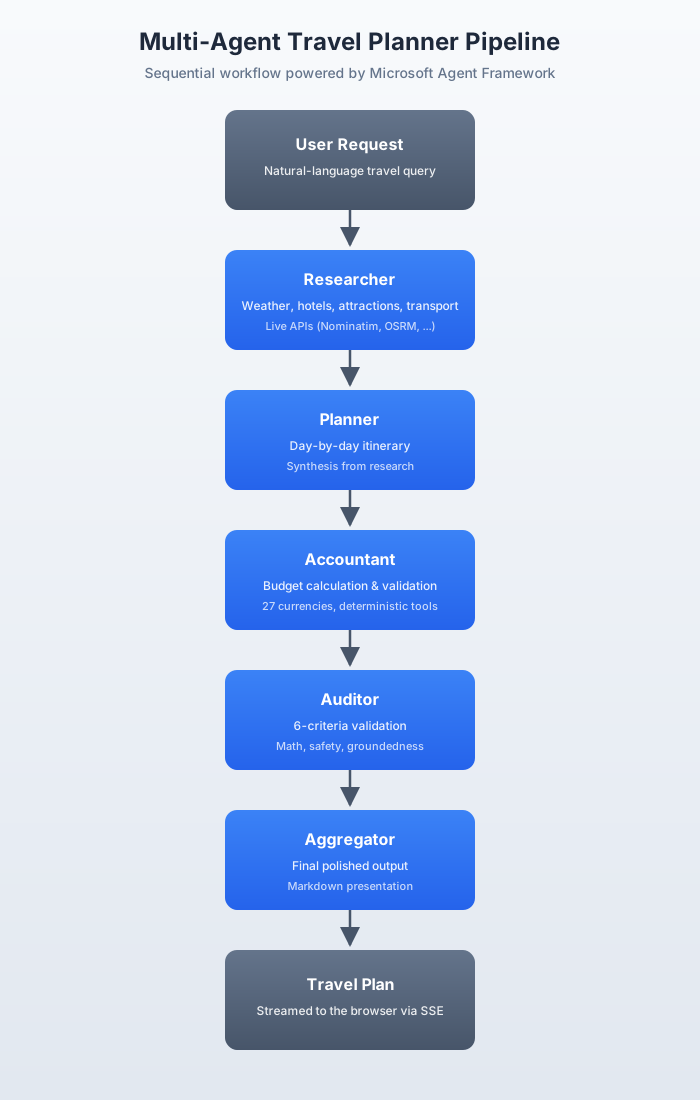
That composition is built with AgentWorkflowBuilder.BuildSequential:
var workflow = AgentWorkflowBuilder.BuildSequential(
    new List<ChatClientAgent> { researcher, planner, accountant, auditor, aggregator }
);

StreamingRun run = await InProcessExecution.StreamAsync(workflow, userRequest);
await run.TrySendMessageAsync(new TurnToken(emitEvents: true));
The important detail here is not just the order. It is the division of responsibility:
- The Researcher gathers facts and options
- The Planner turns those facts into a day-by-day itinerary
- The Accountant checks whether the itinerary fits the budget
- The Auditor validates the plan
- The Aggregator prepares the final user-facing output
That separation makes the system easier to reason about than a single all-purpose prompt.
Abstracting the model provider
Both Ollama and Anthropic are exposed through IChatClient from Microsoft.Extensions.AI, so the agents do not need provider-specific logic.
ChatClientFactory handles provider selection:
public static (IChatClient Client, Provider Provider, string Model) CreateWithAutoDetect(
    string? preferredProvider = null)
{
    if (!string.IsNullOrEmpty(preferredProvider) &&
        Enum.TryParse<Provider>(preferredProvider, ignoreCase: true, out var provider))
    {
        var model = provider == Provider.Anthropic
            ? "claude-sonnet-4-20250514"
            : "qwen2.5:7b";
        return (Create(provider, model), provider, model);
    }

    var anthropicKey = Environment.GetEnvironmentVariable("ANTHROPIC_API_KEY");
    if (!string.IsNullOrEmpty(anthropicKey))
    {
        const string model = "claude-sonnet-4-20250514";
        return (CreateAnthropicClient(model), Provider.Anthropic, model);
    }

    const string ollamaModel = "qwen2.5:7b";
    return (CreateOllamaClient(ollamaModel), Provider.Ollama, ollamaModel);
}
This is one of the more practical design decisions in the project. It lets you develop against a local model, then switch to Anthropic without rewriting the agent layer.
Fixing the Anthropic adapter mismatch
One of the more interesting details in the project is the AnthropicOptionsInjector middleware.
The Anthropic SDK requires ModelId and MaxOutputTokens on every request, but MAF does not populate those values in ChatOptions. That means requests can fail even though the agent pipeline itself looks correct.
The fix is to wrap the client with a DelegatingChatClient:
internal class AnthropicOptionsInjector : DelegatingChatClient
{
    private readonly string _model;
    private const int DefaultMaxOutputTokens = 8192;

    public AnthropicOptionsInjector(IChatClient inner, string model) : base(inner)
        => _model = model;

    public override Task<ChatResponse> GetResponseAsync(
        IEnumerable<ChatMessage> messages,
        ChatOptions? options = null,
        CancellationToken cancellationToken = default)
    {
        options ??= new ChatOptions();
        if (string.IsNullOrEmpty(options.ModelId)) options.ModelId = _model;
        if (options.MaxOutputTokens == null) options.MaxOutputTokens = DefaultMaxOutputTokens;
        return base.GetResponseAsync(messages, options, cancellationToken);
    }
}
This pattern is useful beyond Anthropic. Any time an orchestration library and an SDK disagree about defaults, a DelegatingChatClient can bridge the gap cleanly.
Creating specialized agents
Each agent is created through a static factory that keeps its instructions, tools, and name in one place.
The Researcher is a good example:
public static ChatClientAgent Create(
    IChatClient chatClient,
    ResearchTools researchTools,
    TravelTools travelTools)
{
    var tools = new List<AITool>
    {
        AIFunctionFactory.Create(researchTools.GetWeatherForecast),
        AIFunctionFactory.Create(researchTools.SearchHotels),
        AIFunctionFactory.Create(researchTools.GetAttractions),
        AIFunctionFactory.Create(researchTools.GetTransportOptions),
        AIFunctionFactory.Create(researchTools.GetFoodRecommendations),
        AIFunctionFactory.Create(researchTools.GetSafetyInfo),
        AIFunctionFactory.Create(travelTools.GetWeather),
        AIFunctionFactory.Create(travelTools.GetFlightEstimate),
        AIFunctionFactory.Create(travelTools.GetEmergencyContacts),
        AIFunctionFactory.Create(travelTools.GetVisaInfo)
    };

    return new ChatClientAgent(
        chatClient,
        instructions: RESEARCHER_INSTRUCTIONS,
        tools: tools,
        name: "Researcher_Agent"
    );
}
Not every agent needs tools. The Planner and Aggregator work from the shared conversation history alone, while the Accountant and Auditor rely on deterministic helper functions.
That split is important. The model handles synthesis and language generation, while ordinary C# code handles the parts where determinism matters.
Using live APIs without making the system brittle
The early version of the project relied on hardcoded destination data. That was useful while bootstrapping the workflow, but it limited the planner to a small set of cities.
The updated tool layer pulls data from several live APIs:
- Nominatim for geocoding
- Open-Meteo for current weather and forecasts
- OpenTripMap for attractions, accommodation names, and food spots
- OSRM for distance and routing estimates
For example, weather forecasting follows a simple pattern:
- Convert a city name into coordinates
- Query Open-Meteo with those coordinates
- Parse the JSON response into a formatted text block for the agent
var coords = await GeocodingHelper.GetCoordinatesAsync(_http, city);
if (coords is { } c)
{
    var url = $"https://api.open-meteo.com/v1/forecast" +
              $"?latitude={c.Lat:F4}&longitude={c.Lon:F4}" +
              $"&daily=weather_code,temperature_2m_max,temperature_2m_min,precipitation_sum" +
              $"&forecast_days={Math.Clamp(days, 1, 16)}&timezone=auto";

    var json = await _http.GetStringAsync(url);
    // parse response and format it for the agent
}
The project also uses a practical fallback strategy: every external call is wrapped so tool failures degrade into a useful message instead of breaking the entire workflow.
That matters in agent systems. A failed API call should reduce confidence, not take down the whole run.
The Auditor pattern
The Auditor is the part of the project that makes the architecture more than a simple agent chain.
Instead of asking one model to plan and validate everything at the same time, the system introduces a dedicated review stage backed by deterministic tools:
ValidateMathConsistencyValidateBudgetFitValidateTravelTimeCheckGroundednessCheckSafetyRequirementsCheckRelevanceCheckCompletenessDetermineAuditDecision
This allows the Auditor to score the plan across six criteria:
- Financial integrity
- Temporal logic
- Safety compliance
- Groundedness
- Relevance
- Completeness
That is the strongest idea in the whole project. LLMs are useful for synthesis and judgment, but they are still weak at arithmetic and consistency checking. Offloading those checks to tools makes the final response more trustworthy.
Streaming the pipeline to the browser
The Web API exposes two main endpoints:
POST /api/travel/planto return the final plan as JSONGET /api/travel/plan/streamto stream progress over Server-Sent Events
The streaming endpoint maps workflow events to frontend-friendly SSE events:
if (evt is ExecutorInvokedEvent invokedEvt)
{
    await SendSseEvent("agent-start", new TravelPlanProgressEvent { ... });
}
else if (evt is AgentRunUpdateEvent updateEvent)
{
    await SendSseEvent("content", new TravelPlanProgressEvent { ... });
}
else if (evt is ExecutorCompletedEvent completedEvt)
{
    await SendSseEvent("agent-complete", new TravelPlanProgressEvent { ... });
}
On the frontend, the stream is consumed with fetch and ReadableStream instead of EventSource.
That choice is subtle but practical. EventSource automatically reconnects, which is often helpful for dashboards, but in this case a reconnect could restart an expensive multi-agent run. Using fetch keeps cancellation and reconnection behavior under explicit control.
The UI then uses those events to:
- highlight the active agent in the pipeline
- append streaming content into the correct tab
- render Markdown progressively
- show a final polished output when the Aggregator finishes
Handling MAF’s silent failures
One thing to watch for with MAF in its current preview state: if an agent throws an exception, the workflow does not propagate it. It completes normally with empty output. Your API returns a success response, your UI shows nothing, and the logs are clean.
The fix is to explicitly listen for ExecutorFailedEvent and WorkflowErrorEvent in the event loop:
else if (evt is ExecutorFailedEvent failedEvt)
{
    var ex = failedEvt.Data as Exception;
    await SendSseEvent("error", new TravelPlanProgressEvent
    {
        Agent = resolved,
        Status = "failed",
        Content = ex?.InnerException?.Message ?? ex?.Message ?? "Agent failed"
    });
}
else if (evt is WorkflowErrorEvent errorEvt)
{
    var ex = errorEvt.Data as Exception;
    // handle workflow-level failure
    break;
}
Without these handlers, a failed agent produces a blank response that looks like a success. This applies to both the blocking and streaming endpoints.
Filtering empty streaming chunks
A related issue: MAF emits AgentRunUpdateEvent with null or empty content during tool-calling turns. If you forward these directly to the browser, the SSE stream floods with empty content events. The fix is a one-line guard before sending:
else if (evt is AgentRunUpdateEvent updateEvent)
{
    var content = updateEvent.Data?.ToString();
    if (string.IsNullOrEmpty(content)) continue;

    await SendSseEvent("content", new TravelPlanProgressEvent { ... });
}
Both of these are easy to miss during development because the happy path works fine. They only surface under real load or when an external API (like an LLM provider) fails.
Evaluating output with MEAI
Once the pipeline works, the next question is whether the output is consistently good.
The project answers that with Microsoft.Extensions.AI.Evaluation.Quality, which uses an LLM as a judge to score the output across several axes:
- Coherence — does the response hang together logically? Are ideas connected, or does it jump around or contradict itself?
- Fluency — is the language natural, grammatically correct, and readable? This is about style and surface quality, not factual content.
- Relevance — does the response actually address what the user asked? A fluent answer to the wrong question scores low here.
- Truth — are the factual claims correct given the available evidence? The judge flags statements that are unsupported or contradicted by the source data.
- Completeness — does the response cover all the parts of the request? A travel plan missing a budget breakdown would lose points.
- Groundedness — are the claims traceable to the input or research data, rather than invented? This is the main hallucination signal.
Each evaluator returns a score and a short explanation. Running them on real pipeline output gives you a numeric quality baseline that you can track over time as you change prompts, models, or tools.
The evaluation tests run the real pipeline, then score the resulting output:
results["Coherence"] = await new CoherenceEvaluator()
    .EvaluateAsync(messages, response, _evalConfiguration!);

results["Fluency"] = await new FluencyEvaluator()
    .EvaluateAsync(messages, response, _evalConfiguration!);

results["RelevanceTruthCompleteness"] = await new RelevanceTruthAndCompletenessEvaluator()
    .EvaluateAsync(messages, response, _evalConfiguration!);
These tests are intentionally skipped by default because they require a live model provider. That is a sensible tradeoff: keep ordinary unit tests fast, but retain a path for deeper quality checks when you want to validate the full system.
Running the application
To run the Web API with Ollama:
ollama serve
ollama pull qwen2.5:7b
dotnet run --project Api/LocalAgentTravelPlanner.Api.csproj
To run it with Anthropic:
# PowerShell
$env:ANTHROPIC_API_KEY="sk-ant-..."
dotnet run --project Api/LocalAgentTravelPlanner.Api.csproj
To run the unit tests:
dotnet test Tests/LocalAgentTravelPlanner.Tests.csprojTo enable the evaluation tests:
# PowerShell
$env:ENABLE_EVAL_TESTS="true"
dotnet test Tests/LocalAgentTravelPlanner.Tests.csproj --filter "Category=Evaluation"
Securing the API
Each request in this project triggers multiple LLM calls across five agents. Without any protection, a single user could exhaust your token budget in minutes. Two basic measures help here.
First, an API key middleware that checks an X-Api-Key header on every /api/* route except the health endpoint. The key is loaded from ASP.NET’s configuration system, so it works with appsettings.json, environment variables, or a mounted file for Docker secrets. The middleware runs early in the pipeline so unauthenticated requests never reach the agents.
Second, a rate limiter on the plan endpoints. The project uses a fixed-window policy — five requests per minute per client IP — which is enough to prevent accidental abuse without blocking normal use. Behind nginx, the app reads the real client IP from forwarded headers rather than the Docker bridge address.
builder.Services.AddRateLimiter(options =>
{
    options.AddPolicy("plan", context =>
        RateLimitPartition.GetFixedWindowLimiter(
            partitionKey: context.Connection.RemoteIpAddress?.ToString() ?? "unknown",
            factory: _ => new FixedWindowRateLimiterOptions
            {
                PermitLimit = 5,
                Window = TimeSpan.FromMinutes(1),
                QueueLimit = 0
            }));
});
Neither of these is novel, but they are easy to forget when the focus is on the agent pipeline itself. If you are exposing LLM-backed endpoints publicly, even for a demo, protecting them early saves a lot of trouble later.
Key takeaways
This project is a good example of how to make an agent workflow more practical in a real application.
- A multi-agent pipeline is useful when each stage has a distinct responsibility
IChatClientis a strong abstraction for provider-swappable .NET AI applicationsDelegatingChatClientmiddleware is a clean way to fix SDK integration mismatches- Deterministic tools are still essential for math, validation, and consistency checks
- Streaming progress makes long-running agent workflows easier to understand and trust
- Evaluation is worth treating as a first-class part of the architecture, not an afterthought
- MAF silently swallows agent errors — always handle
ExecutorFailedEventandWorkflowErrorEvent - Protect LLM-backed endpoints with API key auth and rate limiting, even for demos
The main lesson is that the quality gains do not come from adding more agents for the sake of it. They come from giving each agent a clear role, grounding it with useful tools, and validating the result before it reaches the user.
The source code is available on GitHub.
dotnet csharp artificial-intelligence programming
Comments