
Getting the Most from your Claude Subscription

By Dan Briones
April 14, 2026

Photo by Josh Ausborne, 2006.
Every prompt you send to Claude Code costs tokens. If you understand where those tokens go and how to control them, you can stretch your subscription dramatically further. This guide covers the practical steps I have taken to keep my usage lean without sacrificing capability.
What are Tokens?
A token is the smallest unit of text Claude processes. A token is roughly three-quarters of a word. The sentence “Hello, how are you today?” is about seven tokens. Every interaction, yours and Claude’s, is measured in tokens drawn from a fixed context window.
Think of the context window as a whiteboard. Everything Claude needs to know must fit on it: your instructions, the conversation so far, any files it reads, and its own responses. When the whiteboard fills up, older content must be erased to make room.
What Loads with every Prompt
Most people assume they are only paying for the text they type. In reality, Claude loads a stack of context before it even reads your message.
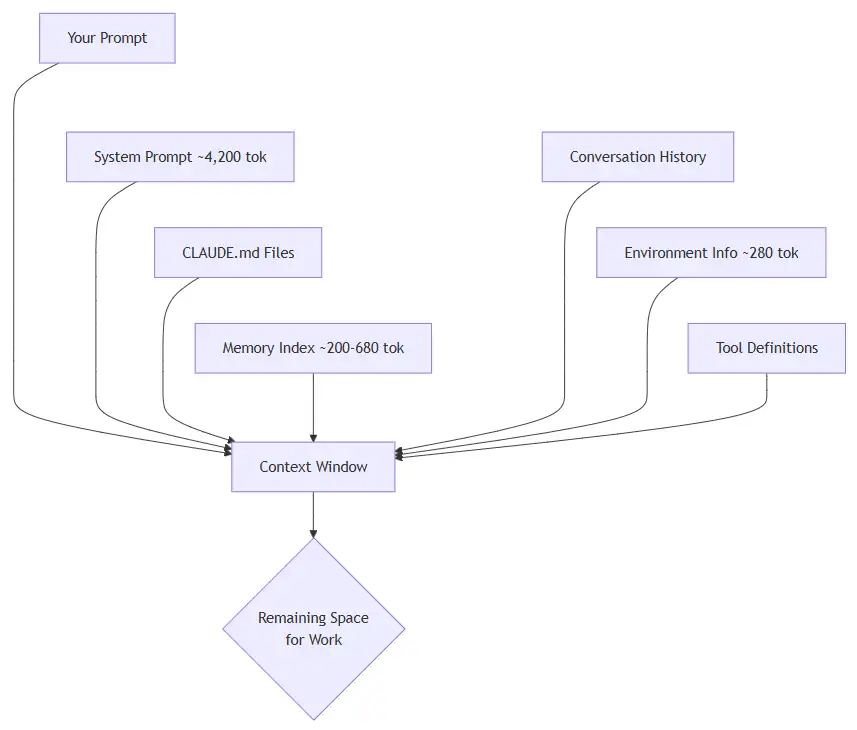
Breakdown of what gets loaded:
| Source | Tokens | When |
|---|---|---|
| System prompt | ~4,200 | Every message |
| Environment info | ~280 | Every message |
| CLAUDE.md hierarchy | Varies | Session start |
| MEMORY.md index | ~200–680 | Session start |
| Conversation history | Grows | Every message |
| File reads and tool output | ~2,500 per file | On demand |
The conversation history is the big one. It compounds with every exchange. A ten-turn conversation where Claude reads a few files each turn can consume most of the context window before you realise it.
The CLAUDE.md Hierarchy
CLAUDE.md files are persistent instructions that load at session start. They exist at multiple levels and all of them stack:
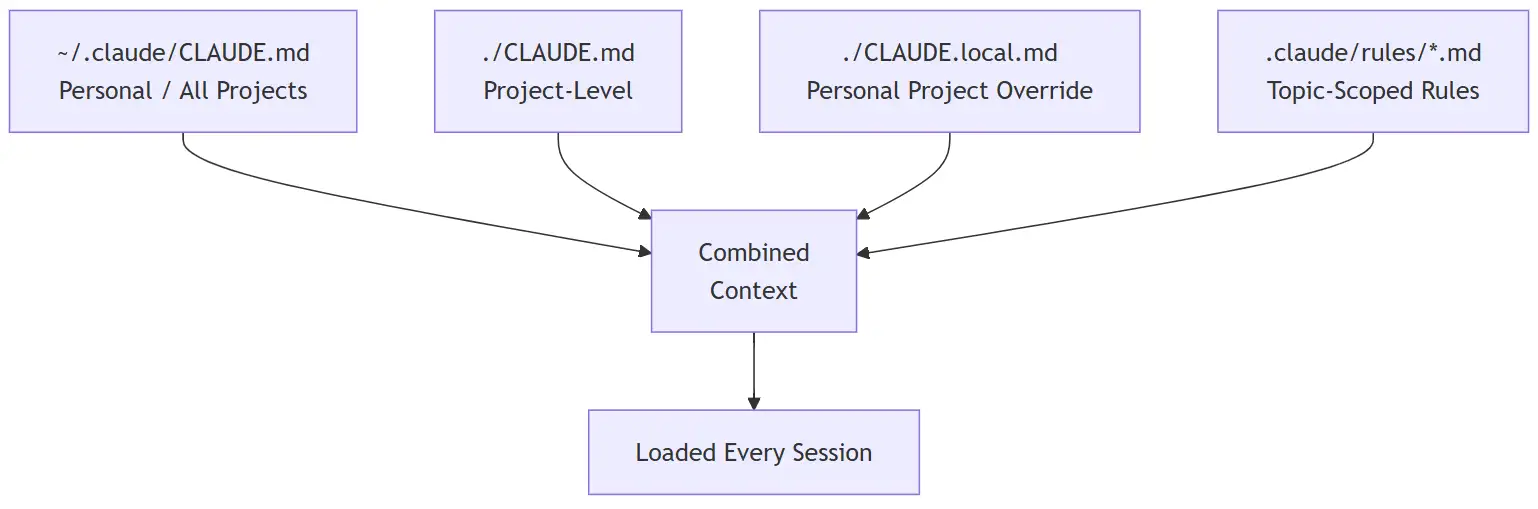
Each file you add here is loaded in full every session. Keep them concise. Aim for under 200 lines per file. Long CLAUDE.md files reduce instruction adherence and burn tokens on every single message.
Memory
Claude Code maintains an auto-memory system at ~/.claude/projects/<project>/memory/. The MEMORY.md index file (first 200 lines) loads every session. Individual topic files only load on demand when Claude decides they are relevant.
This is generally lightweight, but if your MEMORY.md grows large, it silently eats into your budget on every prompt.
The Three Models and How They Use Tokens
Claude Code gives you access to three models, each with different token economics. The model you use makes a significant difference in how fast you burn through your allocation.
| Model | Strength | Token Cost | Best For |
|---|---|---|---|
| Haiku | Fast, cheap | Lowest | Simple tasks, quick lookups |
| Sonnet | Balanced | Medium | Most coding work |
| Opus | Deep reasoning | Highest | Complex architecture, debugging |
How Your Prompt Selects the Model
Your subscription plan and settings determine the default model. You can override it several ways:
- During a session:
/model sonnetor/model opus - At startup:
claude --model haiku - Permanently: Add
"model": "sonnet"to your settings file
The key insight is that you should match the model to the task. Do not use Opus to rename a variable. Do not use Haiku to design a database schema. The difference in token consumption between Opus and Haiku for the same task can be several times over.
Effort Levels
Each model also has an effort setting that controls how much “thinking” it does:
| Level | Behaviour | Use When |
|---|---|---|
low |
Minimal reasoning | Straightforward, mechanical tasks |
medium |
Balanced (default) | General development |
high |
Deep analysis | Tricky bugs, architecture decisions |
max |
No token limit on thinking | Last resort, Opus only |
Change it with /effort low before a simple task, then /effort high when you need deep analysis. This alone can save significant tokens.
Monitoring your Token Usage
You cannot manage what you cannot see. Setting up a statusline is the single most impactful thing I did for token awareness.
Setting up the Statusline
The statusline sits at the bottom of your Claude Code terminal and shows real-time token consumption. Configure it in ~/.claude/settings.json:
{
  "statusLine": {
    "type": "command",
    "command": "bash -c 'data=$(cat); m=$(echo \"$data\" | jq -r \".model.display_name // \\\"Unknown\\\"\"); p=$(echo \"$data\" | jq -r \".context_window.used_percentage // 0\"); ti=$(echo \"$data\" | jq -r \".context_window.total_input_tokens // 0\"); to=$(echo \"$data\" | jq -r \".context_window.total_output_tokens // 0\"); tt=$((ti+to)); f=$(awk \"BEGIN{printf \\\"%d\\\",int($p/10+0.5)}\"); pi=$(awk \"BEGIN{printf \\\"%d\\\",$p+0.5}\"); bar=\"\"; for((i=0;i<f;i++)); do bar+=\"\\xe2\\x96\\x88\"; done; for((i=f;i<10;i++)); do bar+=\"\\xe2\\x96\\x91\"; done; if((pi<50)); then pc=\"\\033[32m\"; elif((pi<80)); then pc=\"\\033[33m\"; else pc=\"\\033[31m\"; fi; if((tt>=1000000)); then td=$(awk \"BEGIN{printf \\\"%.1fM\\\",$tt/1000000}\"); elif((tt>=1000)); then td=$(awk \"BEGIN{printf \\\"%.1fk\\\",$tt/1000}\"); else td=\"$tt\"; fi; printf \"\\033[1;36m%s\\033[0m  [${pc}%b\\033[90m%b\\033[0m] ${pc}%s%%\\033[0m  \\033[37m%s tok\\033[0m\\n\" \"$m\" \"$(printf \"%b\" \"$(for((i=0;i<f;i++)); do printf \"\\\\xe2\\\\x96\\\\x88\"; done)\")\" \"$(printf \"%b\" \"$(for((i=f;i<10;i++)); do printf \"\\\\xe2\\\\x96\\\\x91\"; done)\")\" \"$pi\" \"$td\"'"
  }
}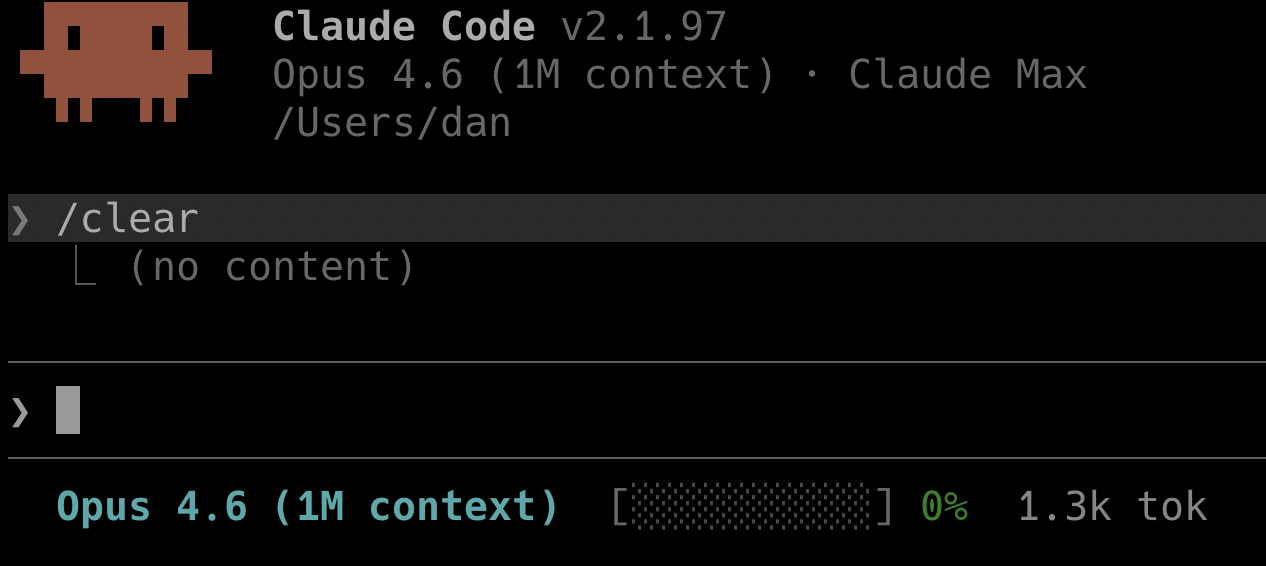
This reads the session JSON from stdin via jq, then renders:
- Model name in cyan
- A 10-segment progress bar using block characters, colour coded: green under 50%, yellow under 80%, red above 80%
- Context percentage as a number
- Total tokens (input + output) in a compact format (e.g.
142.3k tok)
Drop this into ~/.claude/settings.json and it appears at the bottom of every Claude Code session. When the bar turns yellow, compact. When it turns red, compact immediately or /clear.
Other Monitoring Commands
| Command | What It Shows |
|---|---|
/context |
Visual grid of context usage with tips |
/status |
Current model, account, version |
/cost |
Token usage stats (API users) |
Compaction: Your Most Important Habit
Compaction summarizes older conversation history to free up context space. Claude Code does this automatically when the context fills up, but waiting for autocompact is wasteful.
Why Compact at 60%
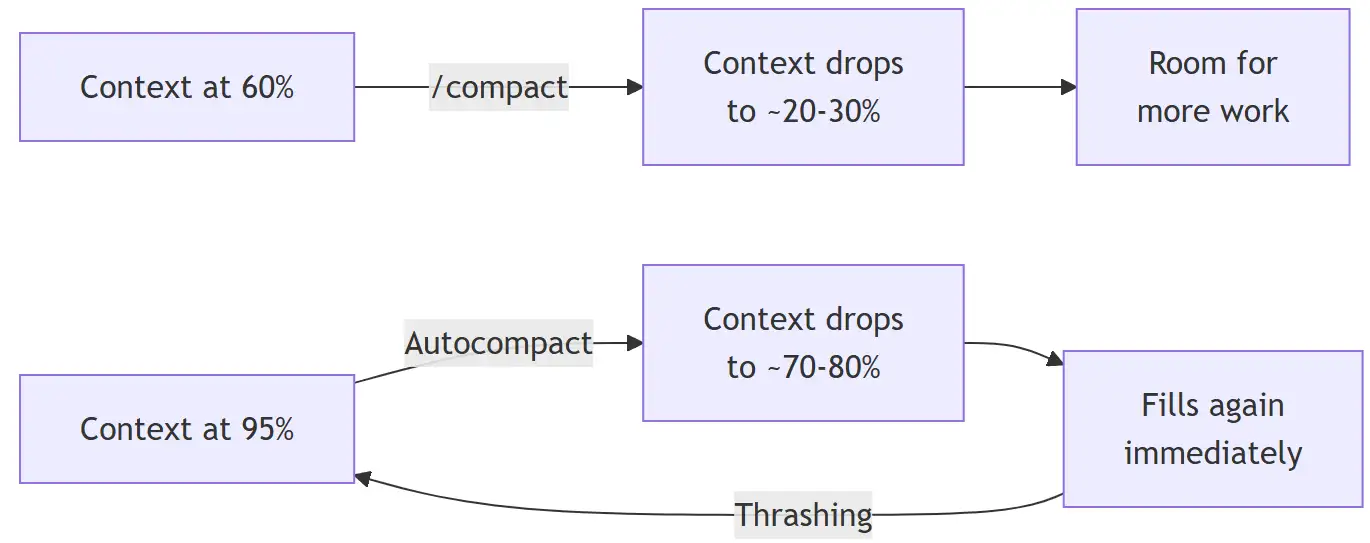
When you wait until the context is nearly full:
- Autocompact fires but can only free a small amount
- The next file read or tool output fills it right back up
- Autocompact fires again. Then again. This is thrashing.
- Eventually Claude gives up and you lose your session
When you compact at 60%:
- There is enough history to summarize meaningfully
- The resulting summary is concise
- You get a large chunk of free space back
- You can continue working without interruption
Using /compact Effectively
You can guide what gets preserved:
/compact                          -- general compaction
/compact focus on the API changes -- preserve specific context
/compact keep only the plan       -- aggressive, targeted
Always tell Claude what matters. A focused compaction produces a better summary and frees more space.
Time of Day and Rate Limits
Claude Code has rate limits measured in tokens per minute (TPM) and requests per minute (RPM). These limits are shared across your team.
The practical effect: during peak hours when your entire team is active, you hit rate limits faster. Early morning or late evening sessions often feel smoother because fewer concurrent users are competing for the same allocation.
| Team Size | TPM per User | RPM per User |
|---|---|---|
| 1–5 | 200k–300k | 5–7 |
| 5–20 | 100k–150k | 2.5–3.5 |
| 20–50 | 50k–75k | 1.25–1.75 |
Anthropic’s infrastructure serves a global user base, so peak load follows the sun. The busiest window is when North American and European working hours overlap. Here is a rough guide for three major time zones:
| City | Peak Hours (Local) | Low Traffic (Local) |
|---|---|---|
| London (GMT/BST) | 09:00 - 17:00 | 21:00 - 06:00 |
| New York (EST/EDT) | 09:00 - 18:00 | 22:00 - 06:00 |
| Los Angeles (PST/PDT) | 08:00 - 17:00 | 21:00 - 06:00 |
The global peak, when the most users are active simultaneously, is roughly 13:00 - 17:00 UTC. That window is mid-afternoon in London, late morning in New York, and early morning in Los Angeles. If you have flexibility in when you do heavy Claude work, shifting to early morning or evening local time can noticeably reduce rate limit friction.
This means your workflow matters. If you are sending rapid-fire prompts during a team standup where everyone is also using Claude, you will hit limits. Batch your work thoughtfully.
Practical Habits That Save Tokens
Keep Tasks Small and Focused
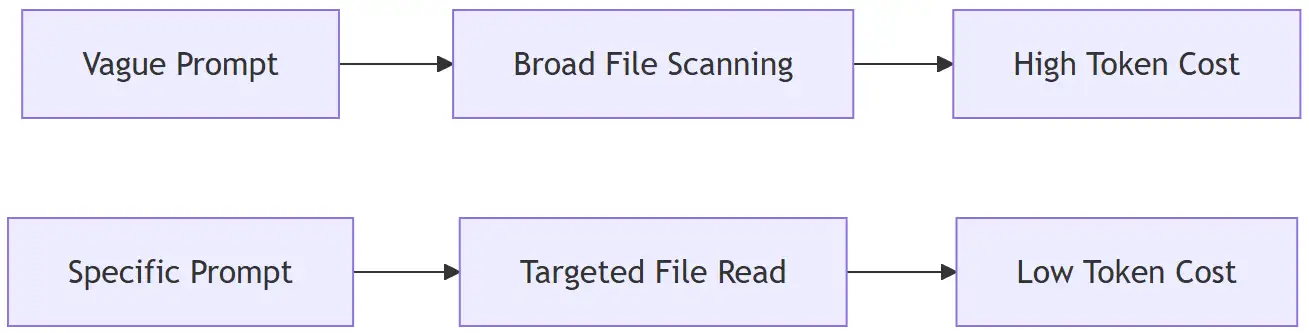
Vague prompts like “improve the codebase” force Claude to scan broadly, reading files it does not need. Specific prompts like “add input validation to the login endpoint in src/auth.ts” let Claude work surgically.
Group Work by Skill
If you need to write tests, write all the tests in one session. If you need to update API endpoints, do them together. Switching between unrelated tasks within a single session wastes context because Claude has to hold multiple unrelated threads in memory.
Use /clear Between Unrelated Tasks
/clear wipes the conversation history and frees all context. Before clearing, name your session with /rename so you can find it later with /resume.
A good workflow:
- Start a focused task
- Work until done or until context hits 60%
/compactif continuing,/clearif switching topics/rename "descriptive name"before clearing
Use Plan Mode for Complex Work
Press Shift+Tab twice to enter plan mode. Claude reads and proposes an approach before writing code. This prevents expensive rework when the initial direction is wrong. Review the plan, iterate in conversation, then execute.
Delegate Verbose Work to Subagents
Test runs, log parsing, and documentation fetching consume enormous context. Subagents run in their own context window and return only a summary. The verbose output stays out of your main conversation.
Understanding Your Subscription Quota
Claude subscriptions use a rolling 5-hour window for usage limits, plus a separate weekly quota. Understanding these mechanics unlocks a simple but powerful trick.
The 5-Hour Rolling Window
The timer does not reset at midnight. It starts when you send your first prompt and rolls forward from that moment. Messages you sent at 9 AM stop counting against your quota by 2 PM. After 5 hours, your allocation gradually replenishes.

This creates a practical opportunity: send a short prompt early to start the timer, even if you are not ready to work. A quick “hello” or a /status check is enough. The 5-hour clock begins ticking immediately. By the time you sit down for focused work 30 or 60 minutes later, you are already that much closer to your window expiring and resetting. Over a full workday this can mean the difference between one reset and two.
The Weekly Quota
Separately from the 5-hour window, there is a 7-day rolling cap. If you exhaust the weekly quota, waiting 5 hours will not help. You must wait for the 7-day window to roll past your heaviest usage period. This is why daily token discipline matters. Burning through tokens recklessly on Monday can leave you throttled by Thursday.
Extra Usage: Pay-as-You-Go Overflow
If you have a payment method on file, you can enable extra usage so Claude Code continues working when you hit your plan limits instead of blocking you. Overflow tokens are billed at standard API rates.
To enable it, go to Settings > Usage on claude.ai and click Adjust limit to set a monthly spending cap. You can also configure it from the terminal with /extra-usage. Once enabled, hitting a rate limit is seamless. Claude keeps working and the overflow cost appears on your next bill.
This is worth enabling even if you rarely hit limits. It acts as a safety net for those sessions where you are deep in a complex problem and cannot afford to stop.
Putting It All Together
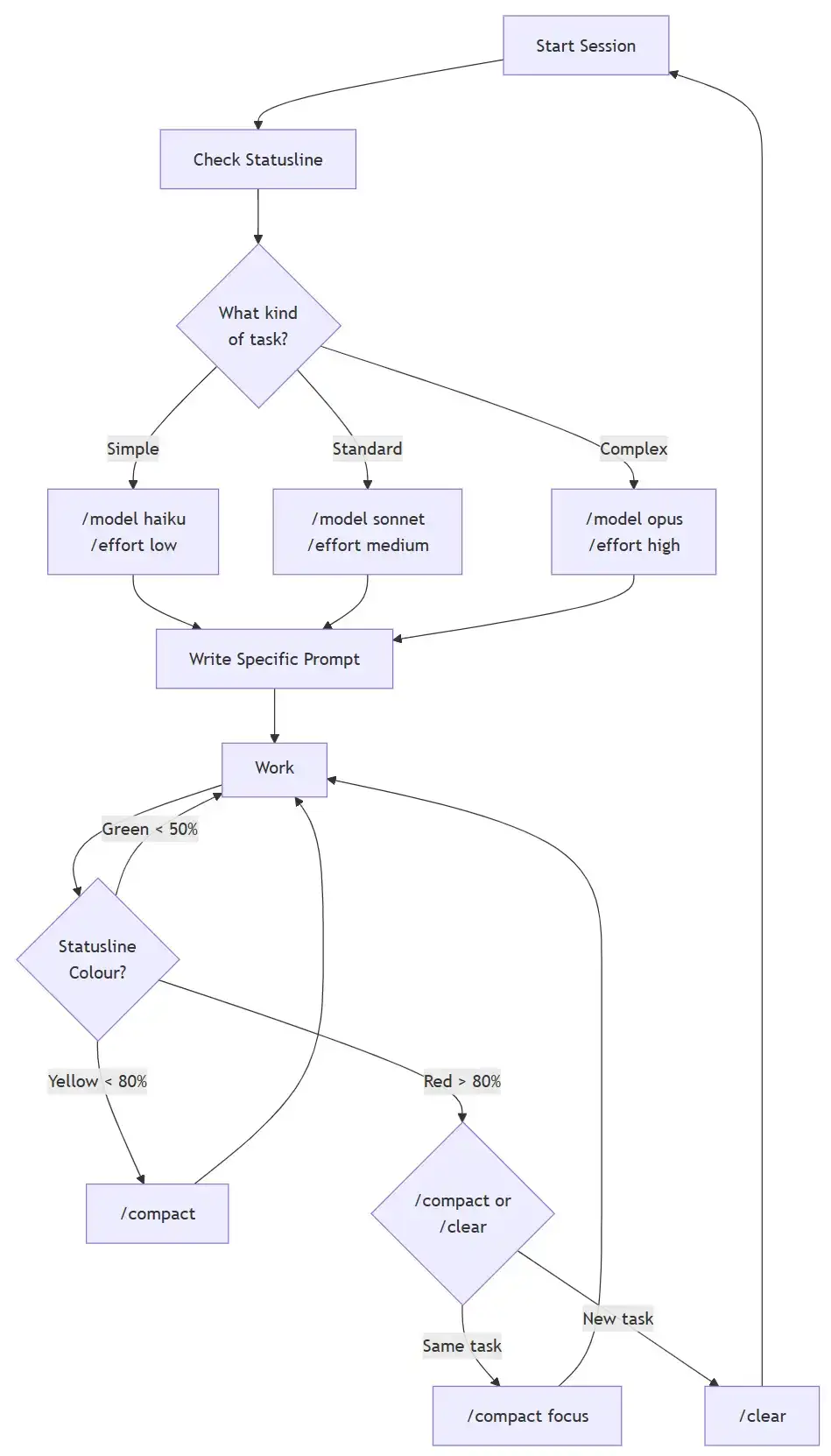
The short version:
- Monitor your token usage with a statusline
- Match the model and effort to the task
- Compact at 60%, not at the limit
- Clear between unrelated tasks
- Be specific in every prompt
- Group related work together
- Delegate verbose operations to subagents
- Time heavy work outside peak team hours
Token efficiency is not about being stingy. It is about being intentional. Every token saved is a token available for actual work. Set up your monitoring, build the habits, and your subscription will go much further.
Comments